How Grab’s Layered Defense Keeps Faster AI-Assisted Releases Safer
AI coding assistants can produce code faster, but speed alone does not make releases safer. Grab’s approach treats mobile crash prevention as a chain of controls: inspect changes before merge, test early builds, limit exposure at launch, and respond quickly when production data signals trouble. Each layer catches risks the others miss.
Grab describes this as a layered defense across the full mobile development and release cycle. The point is not that every defect can be prevented. That is wishful thinking. The point is to give a problem fewer chances to reach users, and to reduce its impact if it does.
That distinction matters more as coding assistants make it easier to generate and revise code. Faster typing does not automatically mean more defects, but it can increase the volume of changes teams must review, test, and release. In the account published by Grab Engineering, independent feature flags and a high flow of merge requests are part of the practical challenge: one change can create a crash even when other changes in the same release are sound.
What Is Grab’s Layered Crash Defense?
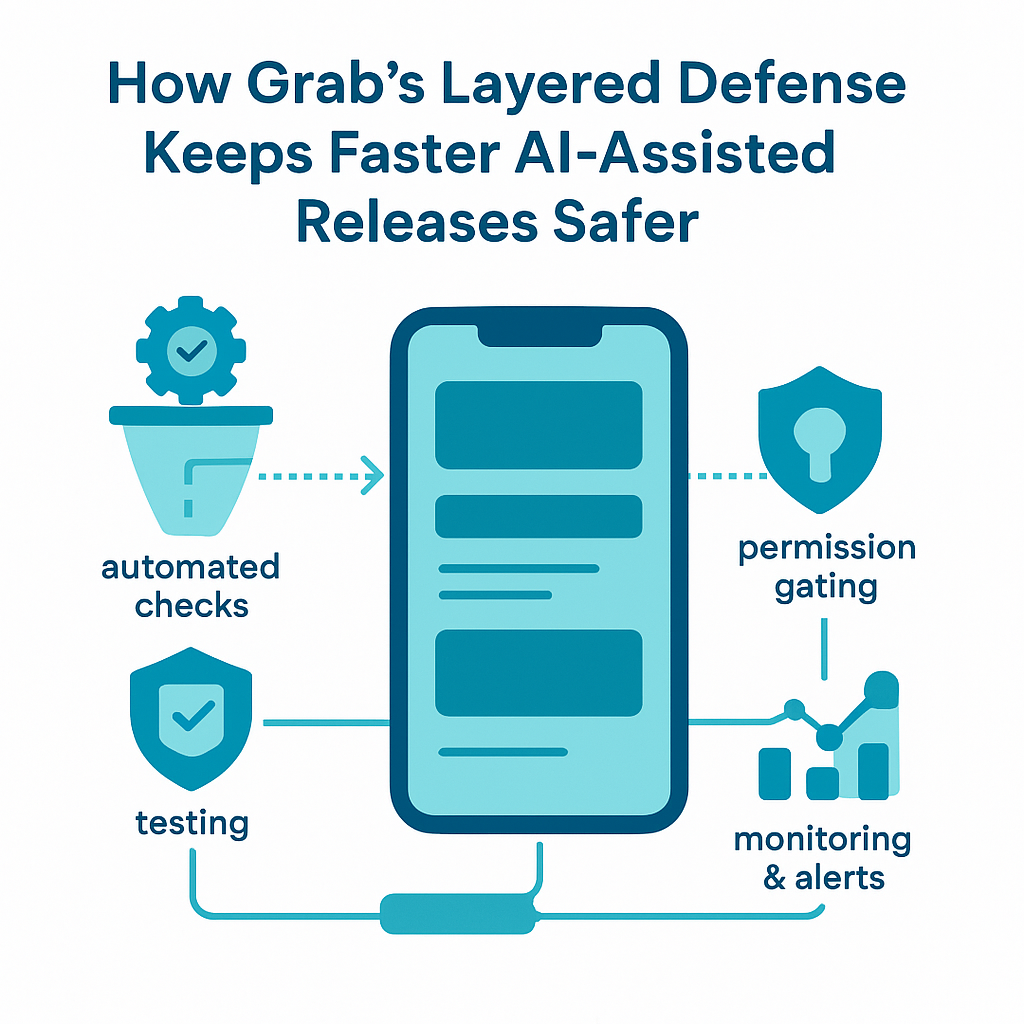
A layered crash defense is a set of safeguards placed at different points in the software lifecycle. One layer checks the code before it merges. Another exercises the app in testing. A later layer limits how many people receive a new build or feature. The final layers spot crashes in production, help engineers find their cause, and feed lessons back into the next round of development.
Grab frames the work in three broad phases: pre-merge through pre-production, release control, and post-release response. The first phase aims to prevent defects from reaching users. The second reduces exposure when a version or feature launches. The third detects problems that got through and supports investigation and containment. This is a practical form of shift-left engineering, but it does not pretend that early checks replace production monitoring.
Before a change merges, platform-specific analyzers such as Android Lint and SwiftLint can identify common coding problems. Teams can combine community rules with custom checks that reflect their own codebase. Android’s official lint documentation explains how checks can inspect Android project source for potential bugs and improvement opportunities. These tools are useful, but they only find the issues their rules can recognize. They do not prove that a feature behaves correctly for every user, device, or network state.
Testing adds another kind of evidence. Unit tests check small pieces of behavior; UI tests exercise user flows; and quality assurance checks can catch problems that automated tests miss. Grab also uses Grab Early Access, or GEA, to distribute early builds to internal users and monitor them before public release. Internal users are not a perfect sample of customers, but an early crash seen by a small group can warn the team before a much larger group encounters it.
Release controls add a different safety net. A staged rollout starts with a limited share of users, giving engineers a chance to watch for abnormal crash rates before expanding distribution. Feature flags can keep a feature off or turn it on for selected groups, even when the app version itself has already shipped. After release, crash reporting and analysis connect failures to app versions, sessions, and code changes where possible.
Frankly, the word layered matters more than the name of any single tool. A linter cannot replace testing. Testing cannot catch every production-only failure. A staged rollout cannot diagnose a bad stack trace. A sound system uses different controls because each one has blind spots.
Why This Approach Matters
Crash prevention is not merely a matter of tidy engineering. A crash interrupts someone who is trying to use the app, and repeated failures can make the product feel unreliable. For a service app, that interruption may prevent a person from finishing a task, finding information, or contacting support. The people affected are not abstract test cases; they have limited time and reasonable expectations that the software will work.
Grab points to several costs of mobile crashes. They can lower crash-free session rates and may affect an app’s Google Play standing. They can also remain on devices longer because some users do not enable automatic updates. A bad release is therefore not always fixed when a hotfix becomes available. Some users will still be running the version that contains the defect.
Here’s the kicker: release exposure is not controlled by app version alone. Grab notes that teams may activate features behind flags independently of a store release. That gives teams useful flexibility, but it also means the risk can change after the app has shipped. A stable build can become unstable when a feature is enabled for a new group, so teams need to observe flag changes as carefully as version rollouts.
The main benefits of the layered approach include:
- Earlier defect discovery. Linters and tests can catch known classes of problems before a change reaches production. The sooner a defect appears, the smaller the set of possible causes usually is.
- Lower blast radius. Staged rollout and gradual feature activation limit the number of people exposed while teams gather evidence. A small first cohort is not a guarantee, but it gives the team a chance to pause.
- Faster containment. A feature flag can often disable a problematic feature without waiting for a new app-store release. That is especially useful when the crash is tied to a feature that can safely be switched off.
- Better investigations. Crash reports enriched with version, session, and release information can help engineers narrow down which change introduced the failure. Grab describes using Firebase Crashlytics and BigQuery to detect anomalies and investigate crashes.
- Useful learning after an incident. Post-mortems can expose a missing test, weak lint rule, or rollout gap. The goal is to improve the system, not to find a person to blame.
In my view, the last benefit is the one teams most often shortchange. A team can close a crash ticket and move on, yet the same class of failure may return because no test or rule changed. Good incident learning turns a painful interruption into a practical improvement. That is also a matter of stewardship: teams should treat user trust, engineering time, and the work of colleagues as things worth protecting.
How to Build a Layered Crash-Defense Process
A team does not need Grab’s scale to use the same basic logic. The tools and thresholds should fit the product, but the sequence is broadly useful. Start with the risks that matter, place a control near each risk, and make sure somebody can act when a control raises an alarm.
- Set a clear stability baseline. Decide how the team will measure crashes. Crash-free sessions and crash-free users answer related but different questions; a single user may have several sessions, and one session can contain more than one failure. Set a baseline by app version and platform, then define what counts as a concerning change. Do not pick a threshold just because it sounds precise. It must fit traffic volume, release size, and the product’s risk.
I have seen dashboards become decorative when no one agrees on what action an alert should trigger. A useful measure connects to a decision: pause the rollout, disable a feature, investigate a specific release, or accept a short-lived fluctuation after checking the data.
- Put static checks in the normal development path. Run Android Lint, SwiftLint, and any custom rules as part of local development or continuous integration. Keep the rules focused on issues the team can explain and fix. If every warning is treated as equally urgent, developers learn to ignore the whole list. The Android Lint guidance describes checks that can flag potential problems in Android code; teams should still review the findings in the context of their own app.
Add rules when incidents reveal a repeated mistake, not merely to make the rule count look impressive. A rule should have an owner, a reason, and a path for dealing with legitimate exceptions. Otherwise, exceptions pile up and the analyzer becomes noise.
- Test behavior at more than one level. Unit tests are fast and useful for focused logic. UI tests can exercise important user flows. Manual QA can explore awkward combinations that automated scripts do not cover. No single test type is a substitute for the others. Prioritize tests around high-impact actions, code that changes often, and areas where failures have been costly.
AI-generated code deserves the same review and testing as code written by hand. In fact, a polished-looking change can be more dangerous than an obviously rough one: readable code may still make the wrong assumption about a nil value, a delayed network response, or a device-specific state. Review behavior, not just style.
- Use a pre-production gate with real users and devices. Grab Early Access gives internal users a chance to run early builds and report crashes before public distribution. A small internal audience cannot represent every customer, but it can expose startup failures, broken flows, and device issues before the release has broad reach. Make the test window long enough to exercise important paths, and give testers a simple way to report what they were doing when the app failed.
Do not treat a clean GEA period as proof of safety. It is evidence, not a certificate. Internal users may have newer devices, better network access, or different account settings than customers. Pair this gate with automated tests and production monitoring rather than asking it to carry the whole burden.
- Release gradually and watch the right signals. Start a new version with a small rollout cohort. Monitor crash rates and compare them with the previous version, while checking whether the sample is large enough to mean anything. Google Play’s documentation explains staged rollouts as a way to release an update to a selected percentage of users. The percentage is a control, not a magic number: a tiny cohort may be too small to expose a rare failure.
Make the pause decision before the rollout begins. Identify who can stop expansion, what signal requires a pause, and how the team will communicate the decision. A staged release that keeps expanding automatically while the on-call engineer hunts through dashboards is not much of a safety system.
- Treat feature flags as release controls, not a cure-all. Roll out a feature to selected groups, monitor the impact, and be ready to turn it off if crash rates cross an agreed threshold. Test both the enabled and disabled paths, because flag logic itself can fail. Also verify that disabling the flag will stop the risky code from running. If the app crashes before it checks the flag, a remote switch will not help.
Give important flags an owner and a removal date. Old flags create branching behavior that is hard to understand and test. A flag should reduce risk during a change, not become a permanent maze of conditions.
- Connect crash evidence to code and release context. Capture enough metadata to answer basic questions: which app version was running, which platform and device were involved, which feature flags were active, and what release or change may be related? Grab describes using Crashlytics and BigQuery for monitoring and analysis, and enriching diagnostics to map crashes to likely changes. Firebase’s Crashlytics documentation covers crash reporting and diagnostic details that can support this work.
Protect user privacy while collecting diagnostics. Keep the data relevant to reliability, limit access, and avoid placing sensitive personal information in logs. More data is not automatically better evidence.
- Respond, then improve the system. When a crash rate rises, confirm that the signal is real, identify affected versions and cohorts, and contain the issue through a rollout pause or a safe flag change. Then investigate the stack trace, release timeline, and session context. If symbolication is incomplete, say so and use the available evidence carefully; guessing at a cause wastes time and can lead to a risky fix.
After service is stable, write a blameless post-mortem that records what happened, how it was detected, what limited or worsened the impact, and which safeguards should change. Google’s Site Reliability Engineering guidance on post-mortem culture explains why learning-focused reviews help teams improve reliability. Keep follow-up actions small enough to finish and specific enough to verify.
The order matters. Prevention lowers the chance of a crash; release controls limit exposure; response shortens the time the problem remains active. Together, these steps form a repeatable process rather than a pile of tools.
Comparison Table: Layered Defense vs. a Single Final Test Gate
There is no named vendor competing with Grab’s approach in the information available here. The practical alternative is a common but weaker pattern: rely mostly on one final QA or pre-release gate, then send the full release to users. The table compares that single-gate model with a layered defense. It is a process comparison, not a claim that every team using one gate will have the same results.
| Area | Layered crash defense | Single final test gate |
|---|
| When risks are checked | Before merge, in pre-production, during rollout, and after release | Mostly near the end, before release |
| Types of controls | Static analysis, automated and manual tests, early access, staged rollout, flags, monitoring, and incident learning | Primarily a final QA pass or release checklist |
| Production exposure | Can begin with a limited cohort and expand after review | Often broad once the gate passes |
| Response to a risky feature | A flag may disable the feature without a new app version, if the failure path allows it | Usually requires a code change and another release, unless a separate control exists |
| Diagnosis | Can combine crash reports with release, session, and flag context | May depend on reproducing the issue after customers report it |
| Main weakness | Requires clear ownership, reliable data, and coordinated controls | A defect missed by the one gate has fewer later barriers |
| Best fit | Products with frequent changes, varied devices, or meaningful release risk | Very small products with low change volume, provided the risk is understood |
A layered system takes more setup and ongoing care. Teams must maintain test suites, keep alerts useful, and clean up old flags. A single gate looks simpler, but it concentrates risk at one point. If that check misses a failure, there may be no other control between the defect and the full user base.
Let’s be real: layered defense does not mean every team needs every tool Grab uses. The lesson is to avoid relying on one checkpoint. A small app might use basic linting, a focused test suite, a staged release, and crash reporting. The controls can be modest; the important part is that they cover different failure modes and that someone knows what to do when one catches a problem.
Common Mistakes to Avoid
The first mistake is assuming faster code production means the same review process will remain adequate. AI tools can help with boilerplate, tests, and routine edits, but they can also increase the number of changes waiting for human attention. If review time stays fixed while change volume rises, reviewers may skim more and question less. The remedy is not a blanket ban on assistants. It is to keep changes small, inspect generated logic, and preserve time for meaningful review.
A second mistake is treating test coverage as proof that the app is safe. Coverage tells a team which code ran during tests; it does not show that the right cases were tested or that the behavior was correct. I have watched teams celebrate a high coverage figure while important device and network conditions remained untested. Measure whether tests protect important behavior, not just whether they touch lines of code.
A third mistake is using a staged rollout without a real pause process. Teams sometimes turn on gradual distribution and assume the tool will catch everything. But rare crashes may not appear in a small cohort, and a noisy alert may be ignored if thresholds are poorly chosen. Decide in advance who reviews the signal and what action follows. Google Play’s staged rollout feature helps control exposure; it does not replace monitoring or judgment.
A fourth mistake is believing a feature flag is an emergency brake for every failure. A flag only helps when the app can safely evaluate it before the crash occurs and when the risky code is actually behind that flag. It may also leave a broken app version installed, even after the feature is disabled. Test the off path and understand exactly what the switch controls.
A fifth mistake is collecting crash reports without enough context—or collecting far more user data than needed. Grab notes that some crashes do not come with clean, symbolicated stack traces, which can make the cause harder to identify. Release history, session metadata, and flag state can help fill gaps. Still, teams should collect only appropriate diagnostics and protect sensitive information. The answer to uncertainty is not indiscriminate logging.
Finally, do not close an incident without changing anything. A post-mortem that says a crash was fixed but leaves the same gap in tests, lint rules, or rollout procedures has recorded history without learning from it. The truth is, a few precise follow-up actions are more useful than a long report that nobody owns. Assign an owner, set a due date, and check whether the improvement works.
Frequently Asked Questions
Do AI coding assistants cause more app crashes?
Not by themselves. They can help developers produce or change code more quickly, but speed does not prove that defect rates rise. The concern raised by Grab is that faster development can increase the volume of changes moving through releases, which gives teams more changes to review and more chances for a defect to slip through. Careful review, testing, and release controls still matter.
What is the purpose of Grab Early Access?
Grab Early Access distributes early app builds to internal users before public release. The team can monitor those builds and catch crashes or broken behavior while exposure is limited. It is a useful pre-production stability gate, but it cannot represent every customer, device, or network condition. It works best alongside automated testing and production monitoring.
How do staged rollouts and feature flags differ?
A staged rollout controls how many users receive a particular app version. A feature flag controls whether selected functionality is active inside an app version. They can work together: a team can release an app gradually and activate a feature gradually. Neither control guarantees safety, and a flag cannot stop a crash that happens before the flag is checked.
What should a team do when a new release has a crash spike?
First confirm the spike and identify which versions, platforms, and user groups are affected. Pause the rollout if the evidence supports it, and disable a related feature only if the flag can safely contain the failure. Then connect crash reports with release and session context, investigate the likely code change, and ship a tested fix when needed. Afterward, record what the team learned and improve the safeguard that failed to catch the issue earlier.
Final thought. AI coding assistants change the pace of software work, but they do not change the responsibility that comes with shipping an app people rely on. Faster development is useful only when teams keep enough time and attention for review, testing, monitoring, and repair. That is not red tape. It is part of doing the work well.
Grab’s approach is valuable because it does not place all its faith in a single test or a single engineer catching every flaw. It puts several modest barriers between a code change and a widespread failure. Each barrier can miss something, but their combined effect gives a team more chances to see trouble early and reduce harm. That protects customers, limits avoidable support work, and respects the effort of the people who build and maintain the service.
No process will prevent every crash. A responsible process makes failures easier to spot, easier to contain, and less likely to recur. That is a sensible standard for any team, whether it ships a global app or a small tool for a handful of users.