Google Cloud API Gateway streaming support lets a gateway pass ongoing responses instead of waiting for one complete payload, while keeping controls such as...
Google API Gateway Streaming Preview: What It Means for AI Apps
Google Cloud API Gateway streaming support lets a gateway pass ongoing responses instead of waiting for one complete payload, while keeping controls such as API keys, JWT checks, backend service-account authentication, logging, and monitoring. The public preview supports SSE, chunked HTTP responses, WebSockets, and gRPC, with streaming connections open for up to one hour.
Key Takeaways- Streaming lets clients receive output as it is produced.
- Google says existing API specifications do not need streaming-specific changes.
- Gateway controls such as authentication and monitoring remain available.
- Each connection can stay open for up to one hour.
- A reported preview limitation is that existing gateways cannot be switched in place.
I’m Ermenildo Valdez Castro, Jr., and I have spent years around the practical side of software systems: getting requests through layers of proxies, identity checks, and monitoring without surprising the people who depend on them. Streaming changes more than how a response arrives. It changes how teams test, measure, secure, and support an API.
That distinction matters for AI. A model that sends its answer bit by bit feels very different from one that waits, thinks, and then drops a wall of text on the screen. Google’s public preview aims to let developers keep those gradual updates behind API Gateway, rather than choosing between streaming and the gateway’s controls. Frankly, that is the useful part—not the word streaming on a product page, but the chance to keep an API’s security and operating rules in the same place.
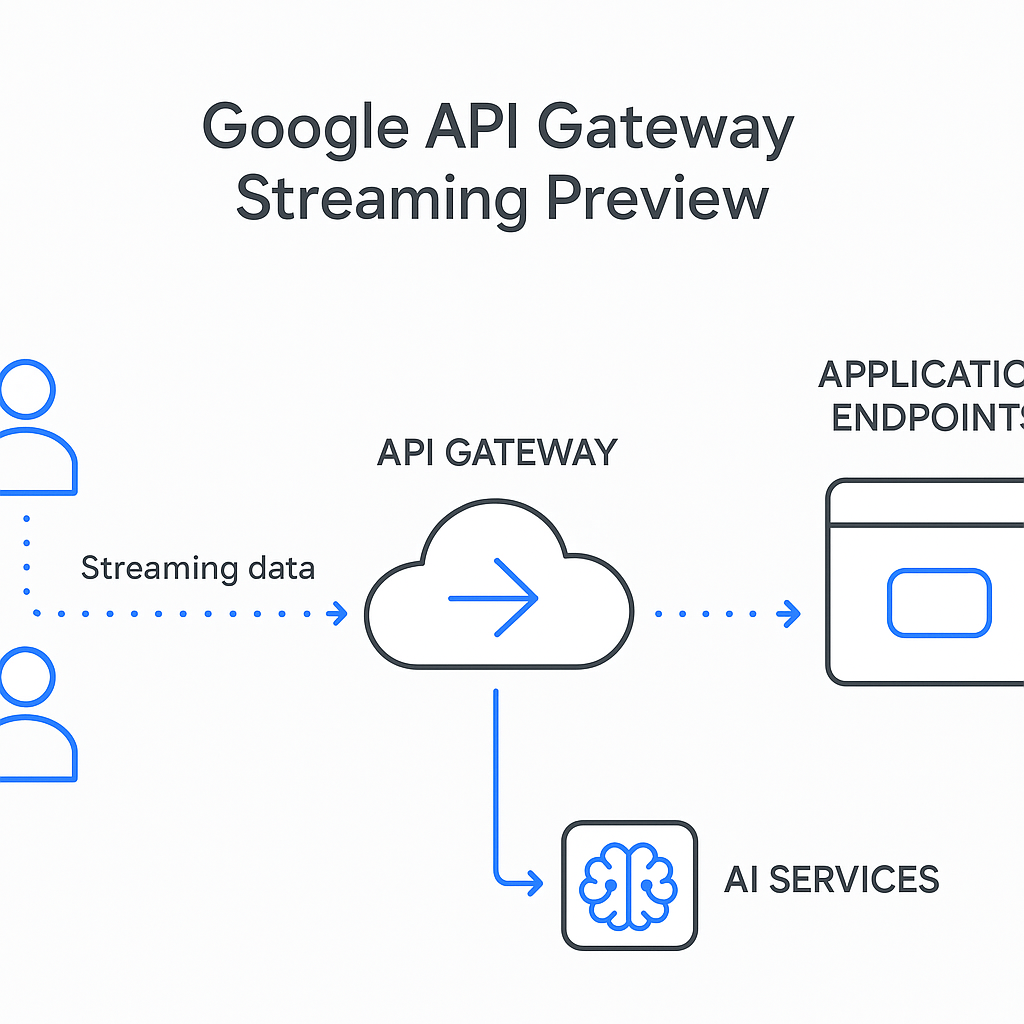
What Is Google API Gateway Streaming?
An API gateway sits between a client and an API backend. It can check who is calling, apply access rules, route a request, and record activity. In a familiar request-response pattern, a client sends a request, the backend finishes its work, and the gateway returns one response. That works well for many APIs. It is less suitable when the backend needs to send useful pieces of a response while it is still working.
Streaming means the response arrives in parts over a connection that stays open. A chat interface can show words as they appear. A service can report the progress of a long task. A client can receive a series of events rather than wait for one finished response. The gateway sits in that path and forwards the stream, while its configured policies and security controls remain available.
Google says the preview supports several patterns: Server-Sent Events (SSE), chunked transfer encoding and HTTP response streaming, WebSockets, and gRPC. These are related but not interchangeable. SSE is commonly used to send events from a server to a browser or other client. WebSockets support two-way communication over a persistent connection. gRPC offers a structured way for services to communicate, including streaming calls. The right choice depends on the client, backend, and message flow—not on whichever acronym is newest.
Google also says developers do not need to modify existing API specifications to add streaming-specific APIs, extensions, or annotations. Existing gateway capabilities remain in place, including API key enforcement, JWT validation, service-account authentication to backends, Cloud Logging, Cloud Monitoring, path templating, and request routing. For background on the service, see the Google Cloud API Gateway overview and its JWT authentication documentation.
There is a limit. Google says a streaming connection can remain open for up to one hour; an application that needs longer communication must reconnect. In my engineering work, persistent connections have a way of exposing assumptions that ordinary requests hide: what happens when a client sleeps, a network drops, or a backend takes longer than expected? Streaming makes those questions part of the API design, not a later footnote.
Core Benefits and Why They Matter
The practical value is not simply that a response moves in smaller pieces. It is that streaming endpoints can use the gateway’s established security and operating controls instead of taking a separate route around them. That can make the design easier to explain and maintain, provided teams test the full path rather than just the model or backend.
- AI answers can appear as they are generated. A model may produce text progressively. Streaming lets a client display those pieces as they arrive, which can make an interaction feel responsive even when the model needs time to finish. It does not make the model itself faster, and it does not guarantee that the first useful token arrives quickly. It changes when the client can show the work.
- Long-running agent tasks can report progress. An agent may plan, call a tool, inspect a result, and then take another step. A stream can tell the client what is happening along the way, rather than leaving a user staring at a blank screen. The progress messages should be accurate; a cheerful spinner is not a substitute for honest status.
- One gateway can remain the control point. Google says the preview retains existing API key enforcement, JWT validation, and service-account authentication to backends. Teams can keep access rules attached to the gateway rather than expose a streaming service directly just to get a live response. The JWT documentation is a useful place to review how one existing control works.
- Monitoring and logs stay part of the design. Google says Cloud Logging and Cloud Monitoring integrations continue to work. That matters when an issue appears only under real traffic, not in a tidy local test. Read the API Gateway monitoring documentation and check what its metrics do—and do not—tell you about a stream.
- Model routing can give clients a familiar entry point. Google describes routing requests to Gemini, Claude, or OpenAI gpt-oss models through one OpenAI-compatible endpoint, based on the model field in the request payload. Combined with streaming, a client can use a familiar streaming interface while the service owner controls which models are reachable and under what policy. Confirm current model availability and routing behavior in Google’s product documentation before designing around it.
I have seen teams treat observability as a dashboard problem, then discover that they never agreed on what a useful measure meant. Here’s the kicker: a stream may take a long time to finish even when its first response arrives quickly. Those are different user experiences and should be measured separately.
There is also a human reason to keep access rules and logs close to the service. AI systems can handle private information and make decisions that affect real people. Responsible engineering means taking care with who can reach a model, what data crosses the boundary, and what evidence is kept for support. That is ordinary stewardship of a system, not a sermon or a special feature.
Step-by-Step: How to Plan and Test Streaming
A preview is a reason to test carefully, not a reason to push a new connection style straight into production. Start with the client experience, trace the whole request path, and decide what you will measure before writing a deployment plan.
- Write down the interaction you want. Is the client receiving model text as it is generated, progress events from an agent, or two-way messages through a WebSocket? Name the user-visible event that counts as progress. In one engineering project, the team first described its goal as “make it faster.” That was too vague to test. We changed the question to “how soon can the user see the first useful update?” and the test plan became much clearer.
- Choose a streaming pattern that fits the traffic. SSE may suit server-to-client events. WebSockets may fit a genuinely two-way interaction. gRPC can fit service-to-service traffic that already uses its protocols. Chunked HTTP responses may suit a backend that can produce a response gradually. Do not select a protocol just because a framework supports it; account for your clients, connection handling, and operational skills.
- Check every hop between the client and backend. List the gateway, backend, load balancers, proxies, client libraries, and any network middleboxes in the path. A component that buffers the response can undo the benefit of streaming, even if the backend emits chunks correctly. Test through the same path users will take. A local backend test proves only that the backend can stream to your local machine.
- Review identity and access rules. Confirm how clients authenticate, which API keys or JWT claims are accepted, and how the gateway authenticates to the backend. Google says its existing API configurations and capabilities continue to work, but that is not a reason to skip a review. Read the current JWT setup guidance, then test permitted and denied requests. A stream that leaks data for fifty seconds is still a security failure.
- Plan gateway creation and hostnames. Google says gateway hostnames now follow a predictable pattern:
GATEWAY_ID-PROJECT_NUMBER.REGION.gateway.dev. That means teams can refer to the planned hostname before the gateway exists, which helps with configuration and deployment planning. However, developer emildrops reported that existing gateways cannot be switched in place to enable streaming. Treat that as a preview constraint to verify against current Google documentation, and plan a new gateway if required. Do not assume a production gateway can be converted with a toggle. - Test the first byte and the full stream separately. Record when the request starts, when the first useful data reaches the client, how often updates arrive, and when the stream ends. Test a slow backend, a client disconnect, a reconnect, an expired credential, and an error halfway through the response. A stream is not healthy merely because it eventually returns a success status.
- Plan for the one-hour connection limit. Google says streaming connections may remain open for up to an hour. Decide how clients will reconnect, how they will avoid repeating an action, and whether the service can resume from a known point. Use an event ID or task identifier where the application needs it. A reconnect should not accidentally trigger a second payment, duplicate a tool call, or start the same long task twice.
- Roll out with a small test group. Compare actual client experience with your baseline, watch errors and backend load, and keep a rollback path. Google’s monitoring guidance is a starting point, not a replacement for application-level measures such as time to first token. During my work on production services, the bugs that mattered most often appeared at the boundary between systems. Test the whole chain, not just the most interesting box in the diagram.
Comparison Table: Google API Gateway and AWS API Gateway
AWS API Gateway is a reasonable point of comparison because it also provides managed API gateway services. The comparison needs a little care: Google’s announcement describes a public preview with several streaming patterns, while AWS documents response streaming for REST APIs using a response transfer mode. The products do not describe every protocol or configuration in exactly the same way, so this is a planning comparison—not a claim that every feature has a direct twin.
| Area | Google API Gateway streaming preview | AWS API Gateway response streaming |
|---|
| Publicly described approach | Google says the preview supports SSE, chunked transfer encoding and HTTP response streaming, WebSockets, and gRPC. | AWS documents response streaming for REST APIs and a STREAM response transfer mode. Check the current AWS guide for API and integration details. |
| Connection duration | Google says a streaming connection can remain open for up to one hour. | Check AWS’s current documentation for the limits that apply to the API type and integration you use; do not assume Google’s limit applies. |
| Existing gateway controls | Google says existing API configurations continue to work, including API keys, JWT validation, backend service-account authentication, logging, and monitoring. | AWS has its own API Gateway features and configuration model. Compare the exact authorizer, integration, logging, and monitoring setup required by your application. |
| Hostname planning | Google gives a deterministic hostname pattern: GATEWAY_ID-PROJECT_NUMBER.REGION.gateway.dev. | AWS endpoint and custom-domain setup follow AWS’s own configuration model; the hostname formats are not interchangeable. |
| Migration question | A developer reported that existing gateways cannot be switched in place during the preview; verify the current requirement before planning a deployment. | Review AWS’s current migration and response-streaming instructions for the specific API you operate. |
The AWS documentation for response transfer modes is the right place to confirm AWS-specific behavior. Google’s API Gateway release notes are the sensible place to check for preview changes. Frankly, a feature matrix is only useful when its limits are visible. Teams should compare the protocols they need, the controls they already use, connection behavior, deployment changes, and the way each platform reports long-lived requests.
If your service already runs on one cloud, moving solely to obtain streaming can create more problems than it solves. If you are choosing a new platform, test a small end-to-end flow with the clients and identity rules you expect to use. A demo that streams to a developer’s laptop does not settle questions about access, monitoring, reconnects, or production traffic.
Common Mistakes to Avoid
Streaming looks simple when shown as a line of text appearing on a screen. Production systems are less polite. They have retries, idle clients, expired credentials, slow backends, and dashboards that flatten different kinds of delay into one number.
- Assuming streaming means low latency. Streaming changes how output is delivered; it cannot guarantee that a model or backend starts producing useful data quickly. Measure time to first byte or first token as well as total completion time. A long response can feel fast if the first useful update arrives promptly, while a short response can feel broken if the client waits too long before seeing anything.
- Reading one latency graph as the whole story. Developer emildrops warned that latency measurements may cover the whole stream rather than time to first byte, which could make latency graphs look wrong even when the service is behaving as intended. Treat that as an important measurement caveat, and verify the metric’s definition in the current product documentation. Add application-level timing if the built-in measure does not answer the question your team cares about.
- Expecting an existing gateway to gain the feature in place. The same developer reported that existing gateways cannot be switched in place. That may affect rollout, hostnames, client configuration, and change approvals. Verify the preview’s current rules and allow time to create and test a replacement gateway if needed.
- Ignoring buffering between services. A backend may flush each chunk correctly while an intermediary holds the data and sends it later in a lump. Test from the actual client path and inspect behavior through every proxy and library. A green unit test does not prove a real-time user experience.
- Treating all protocols as the same thing. SSE, WebSockets, gRPC, and chunked HTTP responses have different communication patterns and client requirements. Choose based on whether communication is one-way or two-way, how clients handle disconnects, and what your backend can support. “Streaming” is a family of techniques, not one magic wire format.
- Forgetting reconnection and duplicate work. A connection can drop before a client receives the final message. Design how the client resumes, how the server identifies a task, and how repeated requests are handled. In a long-running agent workflow, blindly retrying may repeat a tool call. That can turn a minor network blip into an expensive or harmful action.
- Assuming security takes care of itself. Google says existing controls remain available; teams still need to configure and test them. Verify authentication, authorization, backend identity, data access, and logs. Pay particular attention to what a client can request through model routing and which models are permitted for that user or application.
- Treating a preview as a finished contract. Preview features can change. Read current release notes, test in a safe environment, document known limits, and avoid making an irreversible promise to users based on an untested assumption. Here’s what nobody tells you: the small operational decisions usually take longer than the first demo.
Frequently Asked Questions
What does streaming support in Google API Gateway enable?
It lets supported streaming endpoints operate behind API Gateway, so a client can receive data progressively while the gateway remains in the request path. Google says the preview covers SSE, chunked transfer encoding and HTTP response streaming, WebSockets, and gRPC. It is aimed at use cases such as streaming AI model responses, reporting progress during multi-step agent work, and interactive applications. It does not guarantee that a backend will produce data quickly; it provides a way to pass a stream through the gateway.
Do I need to change my API specification to use streaming?
Google says no streaming-specific API specification changes, APIs, extensions, or annotations are required. The announcement also says existing gateway capabilities continue to work, including API key enforcement, JWT validation, backend service-account authentication, Cloud Logging, Cloud Monitoring, path templating, and request routing. Still, review your current configuration and test the actual client-to-backend path. A specification that needs no streaming edit does not prove every proxy, client, or backend is configured correctly.
How long can a streaming connection stay open?
Google says a connection can remain open for up to one hour. If the application needs continued communication after that, the client must establish a new connection. Plan for disconnects and reconnection before relying on long sessions. Decide how a client resumes a task, how it avoids repeating an action, and what the user sees while the connection is being restored. Test this behavior under realistic network conditions rather than assuming the connection will remain uninterrupted.
Can I enable streaming on an existing gateway?
Developer emildrops reported that existing gateways cannot be switched in place. Treat this as a preview limitation to verify against Google’s latest documentation, since preview behavior may change. If a new gateway is required, plan for its hostname, client configuration, security checks, testing, and cutover. Google’s predictable hostname pattern can help teams plan references before creating the gateway, but it does not remove the need to test the replacement and its policies before sending real traffic to it.
Final Thought
Streaming support is useful when it solves a real user problem: a person needs to see an answer forming, understand that an agent is working, or interact with a service that cannot sensibly wait for one final response. It is less useful when a team adds an open connection because streaming sounds modern. Good engineering starts with the user’s need, then checks the cost, security, and failure behavior of the design.
As Ermenildo Castro, I would treat Google’s preview as a chance to test a more complete API path, not as proof that every production concern has disappeared. Keep authentication and monitoring in the gateway, measure the first useful response separately from the full stream, and rehearse reconnects and gateway replacement before a launch. A tool is only as dependable as the care put into its use. The sensible next step is a small, observable pilot with clear limits and a rollback plan.