AI Coding Hallucinations: The Security Risks Hiding in Your Code
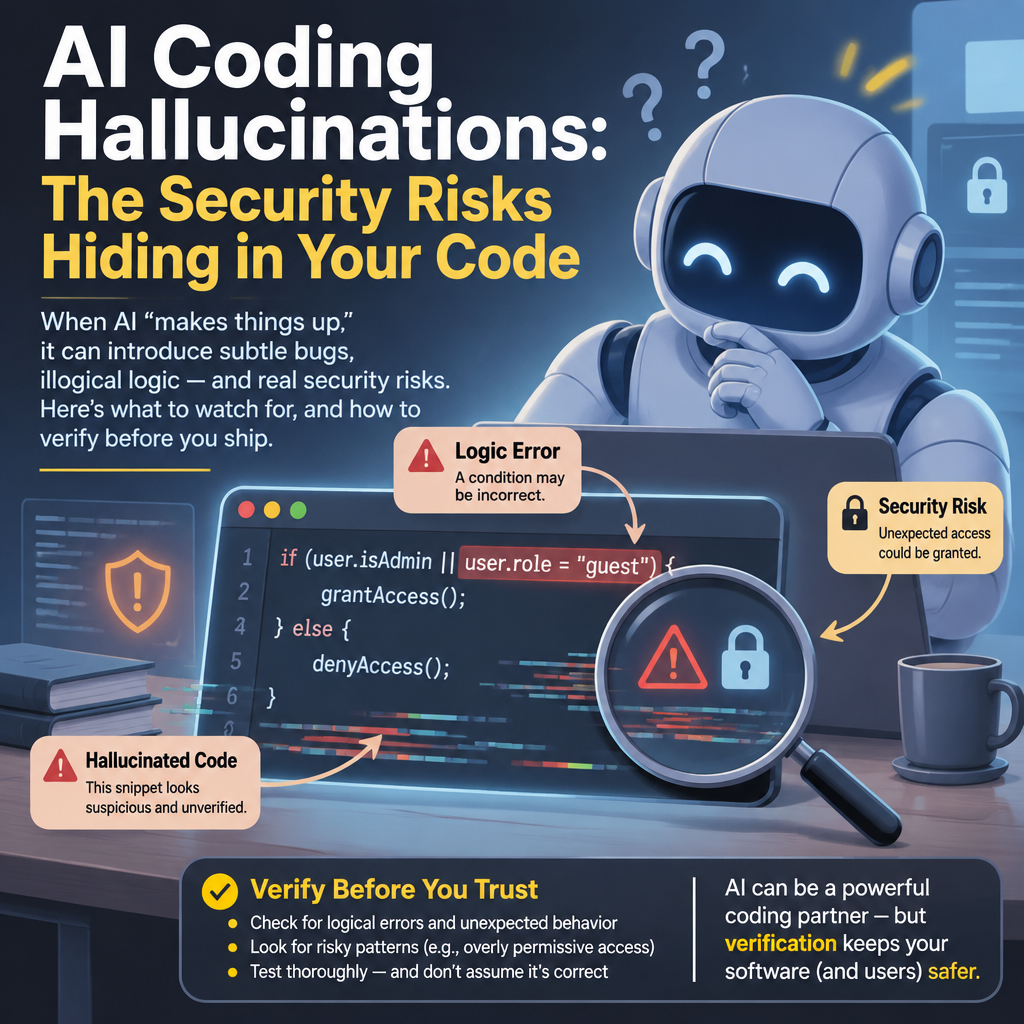
AI coding hallucinations are plausible but false outputs from a model, including invented packages, unsafe authentication code, or cloud permissions nobody requested. They matter because generated suggestions can move from a chat window into a build pipeline in seconds. Treat every suggestion as untrusted until tools and people verify it.
The speed is useful. The confidence is the problem. In my engineering work, I have seen reviewers give clean, well-formatted code a little too much credit, especially when it arrives with a tidy explanation. A compiler can confirm that code parses; it cannot tell you whether the package belongs to a stranger, the authentication flow resists phishing, or the cloud policy grants far more access than the service needs.
This is not an argument to ban coding assistants. It is an argument to put checks where they can catch errors before a suggestion becomes a dependency, a release, or an exposed service. A good workflow keeps the time savings and treats verification as ordinary engineering work.
What Are AI Coding Hallucinations?
An AI coding hallucination is an output that sounds credible but contains an unsupported or false claim. In software, that can be an invented package, a nonexistent method, a made-up configuration option, or a security recommendation that no longer reflects sound practice. The model may not signal doubt. The answer can arrive in polished code with comments that make it look deliberate.
Language models generate text by predicting likely tokens from patterns learned during training. They do not automatically check a package registry, read the latest security advisory, or confirm that a cloud API still accepts a particular option. When the training patterns leave a gap, the model can fill it with something that looks right. That is a useful explanation, not an excuse to trust the result.
Code makes the error especially slippery. A made-up library name may follow the naming style of real libraries. A fabricated function can fit the shape of an existing SDK. Sometimes the code compiles because the invented call happens to match another symbol, or because the questionable line does not run in the tested case. A green build is a narrow signal, not a security verdict.
There are several forms. Package hallucination means a model recommends a dependency that does not exist in the relevant registry at that time. API hallucination means it invents a method, argument, or behavior. Security hallucination means it presents a weak or incorrect control as safe. A model can also create false explanations for real code, which makes reviews harder because the prose and implementation may disagree.
A 2024 study of 16 code-generating models reported that roughly one in five package recommendations in its test set referred to nonexistent packages, with more than 205,000 distinct fabricated names recorded across the study. That figure describes the researchers’ prompts, models, and methods; it is not a universal rate for every tool or codebase. Still, the result shows why package suggestions deserve direct checks. The study is available on arXiv.
Here is the kicker: some invented names recur. If a model repeatedly suggests the same nonexistent package, an attacker may register that name in a public registry and wait for an unwary install. Researchers call this slopsquatting, a package-name attack related to typosquatting. The spelling may be perfect because the model invented the name in the first place.
Why AI Hallucination Checks Matter
Checks protect the useful parts of AI-assisted development. A coding assistant can draft routine code, explain an unfamiliar codebase, or suggest test cases. Those gains are real when engineers verify what they accept. Without checks, faster output can simply push more unreviewed risk toward production.
- They reduce supply-chain exposure. A dependency is not just a line in a manifest. It brings code, maintainers, update paths, and sometimes install-time behavior into your project. Verifying the exact package name, registry, version, and publisher helps stop a fabricated or suspicious dependency before it enters the build.
- They protect authentication and sensitive data. A model may produce an old pattern because it has seen that pattern often. For instance, SMS codes can still be suggested for account protection, even though they are not phishing-resistant. For important accounts, modern guidance favors phishing-resistant methods such as passkeys or security keys, while still planning carefully for account recovery.
- They keep permissions narrow. Generated cloud policies can include broad access because broad access makes an example easier to write. The convenience is not worth giving a small service access to data or actions it never needs. Least privilege is a practical safety rail, not a paperwork exercise.
- They make reviews more meaningful. When an assistant produces a large patch, reviewers need a way to focus on risk. Automated checks can flag new dependencies, broad permissions, weak cryptography, and missing tests, leaving people to assess the parts that require judgment.
- They protect the people who use the software. Security failures are not abstract scorecard problems. A leaked account or exposed record can harm someone who had no say in the team’s tool choices. Treating software work as a responsibility to users is part of doing the work well.
I learned this the hard way in code reviews: clean code can invite a quick approval. In one review, a generated dependency looked ordinary, and the surrounding implementation was easy to follow. The useful question was not whether it looked like a normal package; it was whether the exact name, maintainer, release history, and reason for adding it checked out. That extra pause changed the review from style inspection to risk assessment.
Frankly, no checklist can make a reviewer omniscient. The point is to catch common mistakes consistently and reserve human attention for questions that tools cannot settle. The OWASP guidance on misinformation encourages teams to verify model claims rather than treating fluent output as fact. That is a sensible rule for code, too.
How to Add AI Hallucination Checks to a Development Pipeline
Start with the paths that can do the most harm. A typo in a local test comment is not the same as a new production dependency or an authentication change. Make the checks stricter where the impact is higher, and keep the process light enough that developers will use it.
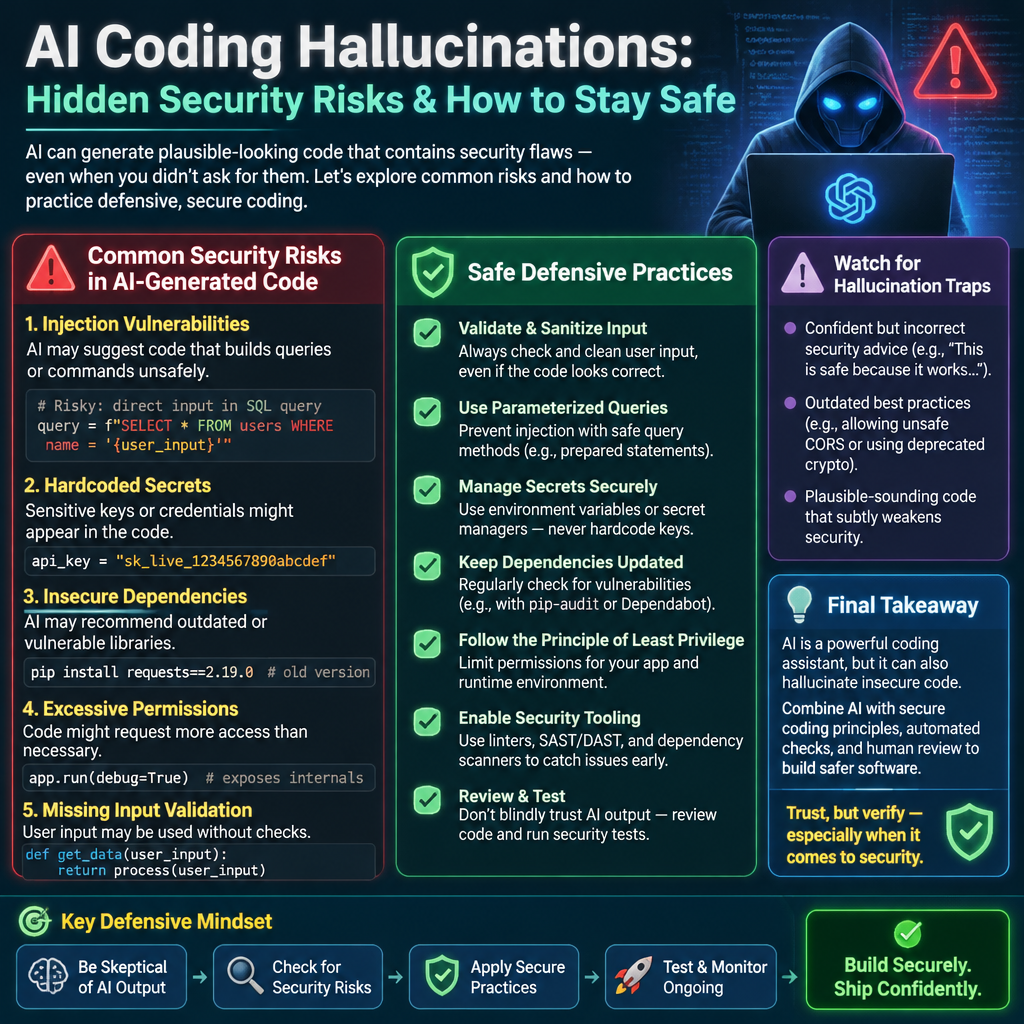
- Set clear rules for AI-generated changes. Decide which code may use an assistant and what must receive extra review. Authentication, authorization, cryptography, secrets handling, deployment policy, and dependency changes deserve careful scrutiny. Write the rule in the same place developers find testing and release instructions.
- Verify every new dependency. Check the exact package name in the expected registry, then inspect its version, publisher, repository, release history, and purpose. A registry entry alone proves only that someone published a package. It does not prove the package is safe, maintained, or the one the developer intended.
- Automate manifest and lockfile review. Use dependency review tools to flag new or changed packages in pull requests. Require a lockfile so builds resolve known versions rather than silently accepting changes. Teams using GitHub can review the platform’s dependency review documentation for one example of this control.
- Check names against trusted registries. A simple automated step can confirm that each imported third-party package exists in the expected registry. Treat a missing package as a stop signal, not an invitation to publish it quickly. A package that does exist still needs normal security and maintenance checks.
- Keep build permissions narrow. Run builds with limited credentials, restricted network access where practical, and no access to production secrets unless the job truly needs them. Package installation can involve code execution during a build or later when software runs. If a dependency is hostile, limited privileges can reduce the damage.
- Test security behavior, not just syntax. Add tests for authorization boundaries, rejected inputs, session handling, and error cases. Static analysis and secret scanning can catch common defects, while dynamic tests can expose unsafe behavior at runtime. None of these tools proves a program secure, but each can catch a different class of mistake.
- Compare security advice with current guidance. For authentication, review the current NIST Digital Identity Guidelines and CISA guidance on phishing-resistant MFA. These resources help distinguish a familiar example from a sound choice for a real system. Do not assume a model has read the newest edition.
- Ground answers in documentation you trust. Retrieval-augmented generation, or RAG, can give an assistant relevant internal or vendor documentation to consult. This can reduce guesses about APIs and configuration, especially when the documents are current and scoped to the task. But retrieval is not a truth machine: the selected pages may be old, incomplete, or wrong, and the model can still misread them.
- Measure the failure rate. Track how often generated dependencies are nonexistent, how often security reviewers reject generated advice, and which prompt types cause trouble. Run a small test set when changing models or assistant settings. Your own measurements are more useful than a broad claim that a tool is either safe or unsafe.
- Record decisions that matter. For a sensitive change, note what the assistant suggested, what was verified, and who approved the final design. This does not mean saving every chat forever. It means preserving enough context to explain why a dependency or security control entered the system.
When I have introduced checks into a team workflow, the best results came from putting them in the pull request and build pipeline, not from telling people to remember one more thing. An allowlist can be useful for high-risk projects, but it needs a clear owner and a sensible update process. Otherwise, teams either bypass it or turn a short review into a queue. Build the guardrail so the safe path is the easy path.
AI-Assisted Coding vs. Manual Coding
The main alternative to AI-assisted coding is not risk-free software. It is conventional development in which people write most code without a generative assistant. Human developers also make mistakes, copy old examples, misunderstand documentation, and add unsafe dependencies. The difference is where errors come from and how quickly they can multiply.
| Area | AI-assisted coding | Manual coding without an assistant |
|---|
| Drafting speed | Often fast for routine code and examples | Depends on the developer’s experience and task |
| Package-name risk | Can suggest convincing names that do not exist | More often involves a package the developer already knows or searches for |
| Security advice | May repeat outdated patterns with confident wording | Can also rely on outdated memory or copied examples |
| Review burden | Large, fluent changes can need careful verification | Reviewers can often trace the author’s choices, though errors still slip through |
| Reproducibility | Depends on prompts, model version, and settings | Depends on code, tools, documentation, and developer judgment |
| Best safeguards | Registry checks, policy scanning, tests, and human review | The same safeguards, plus sound design and code review |
Neither column gets a free pass. Manual work has familiar failure modes, including copy-paste bugs and overconfidence in old knowledge. AI-assisted work adds another source of plausible but unsupported claims, and it can increase the volume of code a team must inspect.
The practical comparison is not “AI or no AI.” It is verified output or unverified output. A careful engineer may use an assistant safely for a small helper function, while a rushed engineer can introduce a serious flaw by copying a code sample from a forum. Tool choice changes the workflow, but it does not remove the need to understand the change.
A useful policy assigns stricter controls by risk. A formatting suggestion might need routine review. A new package, login flow, encryption setting, or production IAM policy should trigger a deeper check. That keeps the process proportionate instead of treating every generated character as equally dangerous.
Common Mistakes to Avoid
Mistake one: trusting polished explanations. A clear rationale can still be fabricated or stale. The model’s tone is not a confidence meter, and comments do not establish that an API exists. Check claims against the registry, source code, or current vendor documentation.
Mistake two: treating a successful build as a security review. Compilation shows that the code met a narrow set of technical rules. It does not prove a package is trustworthy, an access policy is limited, or the login flow resists phishing. Add tests and security review that match the change.
Mistake three: assuming a real package is a safe package. A package may exist and still be abandoned, compromised, typo-similar to a popular project, or inappropriate for your use. Look at ownership and release history, verify the intended project, and follow your organization’s dependency policy. Public availability is not an endorsement.
Mistake four: accepting old authentication advice because it works. An SMS one-time code may be better than having no second factor, but it is not phishing-resistant and may not suit high-risk accounts. NIST and CISA guidance explain stronger options, including phishing-resistant MFA. Passkeys avoid reusable shared secrets, but recovery and device loss still need careful planning.
Mistake five: asking the model to certify its own answer. A second prompt that says “check your work” can catch simple inconsistencies. It cannot independently establish that the first answer is correct, because the same model may repeat the same mistake. Use external evidence and automated controls.
Mistake six: assuming RAG solves hallucinations. A model grounded in a document can still answer incorrectly, use the wrong section, or miss a change in the service. Keep documentation current, show the evidence behind important claims, and ask a human to inspect high-impact decisions. Grounding reduces uncertainty; it does not erase it.
Mistake seven: writing a policy no one can follow. A blanket demand to hand-check every line may sound tough, but it does not scale when tools produce large patches. Focus rules on dependencies, security-sensitive code, and production changes, then automate repeatable checks. Here’s what nobody tells you: a control that is always bypassed is not a control.
Mistake eight: confusing an allowlist with permanent safety. Approved packages can later change ownership, release a compromised version, or become unmaintained. Review updates, pin versions, monitor advisories, and remove dependencies that no longer serve a clear purpose. Security is maintenance, not a one-time stamp.
The pattern behind these mistakes is misplaced trust. The answer is not to assume every model output is malicious, either. Treat it like an outside contribution: inspect the change, verify its claims, and limit the privileges it receives.
Frequently Asked Questions
What is an AI coding hallucination?
It is a plausible-looking model output that is false or unsupported. Examples include an invented package, a nonexistent API, or security advice that is outdated or unsafe. Because the code may look polished or even compile, verify important claims against trusted documentation, registries, tests, and review.
What is slopsquatting?
Slopsquatting is an attack in which someone registers a package name that AI tools tend to invent. A developer may accept the suggestion and install the attacker-controlled package, believing it is a legitimate dependency. Check the exact name and publisher before installation, and do not publish a missing package just to make generated code work.
Can retrieval-augmented generation prevent hallucinations?
No. RAG can supply relevant documentation and reduce unsupported guesses, but the retrieved material may be outdated or incomplete, and the model can misinterpret it. Use RAG as a way to improve the evidence available to the model, then keep tests and human review for high-impact changes.
Are passkeys safer than SMS codes?
Passkeys are designed to resist phishing and do not rely on a password or one-time code that users can reuse across sites. SMS codes are not phishing-resistant and can face risks such as phone-number takeover. The right setup depends on the account and recovery plan; consult current NIST and CISA guidance when protecting important systems.
Final Thought
AI coding assistants are useful tools, not security authorities. They can help a developer draft a routine function, explain an unfamiliar pattern, or produce a first version of a test. They can also invent a dependency or give a convincing answer that would have been safer left unsaid. The sensible response is neither panic nor blind trust.
I have found that the strongest engineering habit is a plain one: verify what can harm someone. Check package names before installation. Read access policies before deployment. Test the authentication behavior instead of admiring its comments. Put the repeatable checks in the pipeline, where they do not depend on a tired reviewer remembering every warning.
There is a human reason to do this carefully. Software work affects customers, coworkers, and people whose data or time we have been asked to protect. Good stewardship means using powerful tools without handing them responsibility they cannot carry. The work still belongs to the people who choose, review, and release the code.
Keep the speed where it helps. Keep the guardrails where mistakes matter. That is how teams can use AI assistance without letting plausible fiction quietly become part of production.