AI coding hallucinations are plausible-looking code, package names, or security advice that turn out to be false. They matter because generated code can move...
AI Coding Hallucinations: Security Risks and Practical Guardrails
AI coding hallucinations are plausible-looking code, package names, or security advice that turn out to be false. They matter because generated code can move from a chat window into a build pipeline quickly, where a fake dependency or weak authentication pattern may be treated like trusted software. The fix is not to ban AI tools; it is to verify their output before execution.
Fast output can feel like progress. I have seen teams move from a convincing code suggestion to a merged change before anyone checked the package registry or asked what permissions the code needed. The danger is not that every suggestion is bad; most useful tools produce plenty of workable drafts. The trouble is that fluency hides uncertainty, and software security often fails at the exact boundary where a plausible guess gets permission to run.
This is a practical problem for developers, reviewers, and security teams. It touches software supply chains, authentication, cryptography, cloud access, and the way teams review code. The right response is neither blind trust nor blanket refusal. It is a repeatable process that checks facts, limits damage, and keeps a person responsible for the final decision.
What Is an AI Coding Hallucination?
An AI coding hallucination is an output that looks credible but contains a made-up or incorrect claim. In software work, that may be an invented package, a function that does not exist, a wrong explanation of an API, or a security recommendation that no longer fits current guidance. The model can present each with the same calm tone. That is the catch.
Most code-generating language models predict likely next tokens from patterns in training data and the context they receive. They do not, by default, query a live package registry, run the code, read your organization’s threat model, or confirm that a cryptographic choice remains approved. Some products add retrieval, execution, or validation tools, but those features need to be enabled and checked. A fluent answer is not proof of a verified answer.
Code makes the issue easy to miss. A fabricated package name can follow the naming style of a real library, while an invented function can look consistent with the SDK around it. The code may even compile if the guessed name happens to refer to something else. I have reviewed patches where the formatting looked polished and the tests passed, yet the key dependency had not been checked against the intended registry. Neat code can still be wrong.
One study of 16 code-generating models reported that roughly one in five package recommendations in its test settings pointed to packages that did not exist, with more than 205,000 unique fabricated names across the evaluated output. That result is a warning, not a universal rate for every model, prompt, language, or team. The researchers described the related attack risk as slopsquatting: an attacker registers a package name that a model tends to invent, then waits for a developer to install it. Read the study, We Have a Package for You, with its testing scope in mind.
A bad suggestion does not automatically become an attack. It becomes dangerous when the development process treats it as trusted input, installs it without review, and gives it access to source code, credentials, or build systems. That is why hallucination is both a model-quality issue and a software supply-chain issue. The useful question is not whether AI can make mistakes. It can. The useful question is what stops one from reaching production.
Core Benefits and Why Verification Matters
AI coding tools can save time. They can draft a test, explain a stack trace, sketch a routine, or help a new teammate learn an unfamiliar codebase. I have used generated code as a starting point when the task was well bounded and the output was easy to test. That is where the tools shine: repetitive work, clear inputs, and a human who knows what success looks like.
The benefit depends on keeping the trust boundary clear. A draft can speed up typing, but it cannot take responsibility for a dependency, permission, or security choice. Here is what a careful process protects:
- Build integrity: Checking package names and versions can stop an invented or wrong dependency before installation. A lockfile records the exact dependency graph, which helps teams see what the build will use.
- Account safety: Reviewing authentication suggestions can expose weak recovery steps, password handling errors, or overreliance on SMS codes for high-value accounts.
- Cloud boundaries: A human can compare generated IAM or cloud policies with the task and remove permissions that were never needed.
- Review quality: Tests and static analysis make claims measurable. A reviewer can ask whether the code meets a defined behavior rather than judging whether it merely looks polished.
- User protection: Secure defaults reduce the chance that a mistake exposes customer records or interrupts a service. Software is work done for people; protecting their data respects their dignity.
A practical example: a generated feature may need to read one object from storage. If the assistant drafts a policy that grants broad access to every object, the feature could work while quietly expanding the blast radius. The correct review asks what the service actually needs, not whether the policy passes a quick demo. Least privilege is not red tape. It is a way to limit harm when something else goes wrong.
Security checks also help teams use AI more confidently. If every generated dependency goes through the same registry check, review, and automated scan as a human-selected dependency, teams do not need to argue over whether the assistant is trustworthy in general. They can inspect each change. The NIST Secure Software Development Framework offers a useful foundation for building security into development work rather than bolting it on after a release.
Frankly, a little verification costs less than cleaning up a compromised build or exposed account. Teams should still measure the tool’s real value: time saved, defects found, and review effort added. Faster typing is not the same thing as safer or better software.
Step-by-Step Guide to Guarding the Pipeline
A guardrail works best when it sits before the risky action. Do not wait until a package is running in a privileged build job to ask whether it exists. Use this sequence for AI-generated code, especially when it adds dependencies or touches security controls.
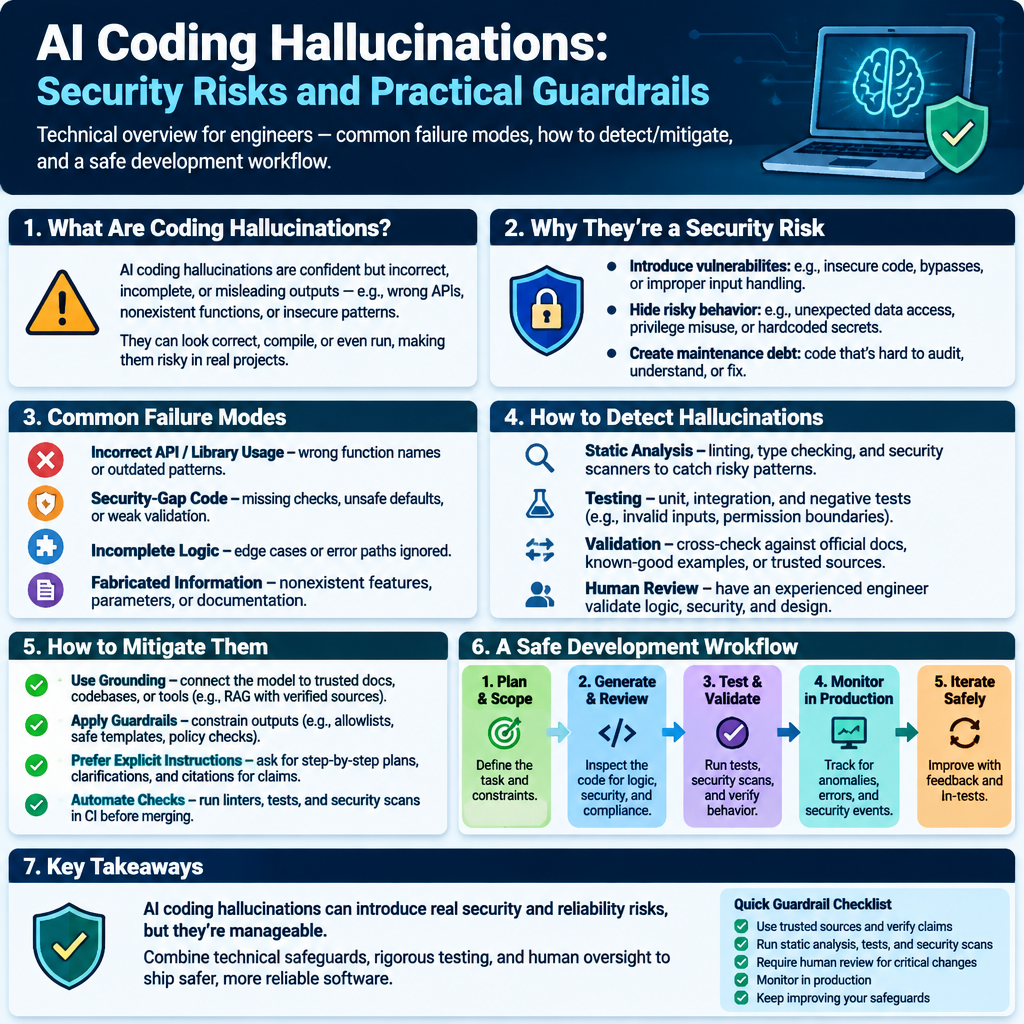
- Mark generated changes clearly. Ask developers to identify AI-assisted code in the pull request when it affects dependencies, authentication, cryptography, cloud permissions, or data handling. The point is not to shame the author. It tells reviewers where a claim may need extra checking and makes ownership clear.
- Verify every proposed dependency. Check the exact name, registry, maintainer, version history, and package purpose in the approved source, such as npm or PyPI. Confirm that the project is the library the code needs, not a similarly named package. A package appearing in a search result does not prove it is safe or maintained. If the assistant cannot explain why the dependency is needed, remove it or ask for a solution using existing code.
- Lock and review the dependency graph. Use a lockfile and inspect changes to it with the source change. Pin versions according to your team’s policy, and run dependency review or software composition analysis on pull requests. GitHub documents how its dependency review feature can flag dependency changes for review. A lockfile is useful, but it is not a safety certificate; a malicious package can be locked just as precisely as a good one.
- Test behavior, not just syntax. Run unit and integration tests, then add tests for security rules that matter. For authentication, test session expiry, recovery, rate limits, and failure paths. For authorization, test that one user cannot read another user’s data. For cryptography, prefer established libraries and supported configurations rather than hand-built algorithms. A successful compile answers one small question. It does not answer whether the code is safe.
- Reduce what the code can reach. Run builds with minimal permissions, short-lived credentials, and isolated environments. Do not expose production secrets to a job that only needs to compile a branch. Restrict network access where practical, and make sure a package install cannot publish releases or change protected settings without a separate approval. If an untrusted dependency behaves badly, a smaller permission set limits the damage.
- Get the right human review. Route authentication, cryptography, cloud policy, and sensitive-data changes to someone who understands those areas. Review the purpose of each permission and dependency. Ask the author to explain the code without relying on the assistant’s explanation. If nobody on the team can assess a risky change, pause and bring in the right expertise; a confident paragraph is not a substitute.
- Keep a record and improve the checks. Save the model or tool name, relevant prompt context, dependency changes, test results, and review decision when policy requires it. Watch for repeated fabricated names or recurring weak patterns. Update allowlists and rules based on evidence, not guesswork. The OWASP Top 10 for LLM Applications is a helpful risk reference, but it does not replace local controls or careful review.
I have seen a lightweight version of this process catch a problem early: a reviewer checked the package registry before running the install command and found the suggested name had no credible project history. The change was simple to fix because the check happened in the pull request, not after the package had entered a shared build environment. Early checks are boring. That is why they work.
Comparison: AI-Assisted Coding vs. Conventional Manual Development
AI assistance and manual development are not opposites. Most teams will use both: a person may choose an approach, ask a model for a draft, then revise it. The useful comparison is how each workflow handles uncertainty and who verifies a change. Neither method guarantees safe code.
| Area | AI-assisted coding | Conventional manual development |
|---|
| First draft | Can produce code, tests, and explanations quickly from a prompt | Depends on the developer’s typing speed and existing knowledge |
| Package choice | May suggest plausible but nonexistent or unsuitable names | May rely on memory, search results, or prior team practice; mistakes remain possible |
| Context | Uses the context provided and may miss hidden system requirements | A developer may know more local context, but can still overlook it |
| Security reasoning | Can explain a pattern fluently without proving it is current or appropriate | Depends on the developer’s security knowledge and access to current guidance |
| Verification need | Requires tests, registry checks, and human review | Also requires tests, dependency review, and human review |
| Best use | Drafting bounded work with clear acceptance tests | Making decisions that need deep domain context and accountable judgment |
Neither row says AI code is always worse or hand-written code is always safe. Human developers also copy old examples, choose abandoned libraries, and grant broad permissions under deadline pressure. AI changes the speed and shape of those mistakes; it can produce convincing output at scale, so weak review habits become more costly.
The biggest difference is the origin of confidence. A developer may remember why a dependency was selected, though memory is fallible. A generated answer may give a tidy explanation that sounds like evidence but is only part of the output. Ask for independent evidence: registry records, official documentation, tests, threat requirements, and code review. Do not accept an explanation as its own proof.
For security-sensitive work, I treat AI as a drafting tool and a human reviewer as the decision-maker. That is not a claim that people never hallucinate or that models have no value. It is a sensible division of labor: use the tool for speed, then use engineering practice to establish correctness. The bar should match the risk. A small formatting helper and an authentication service do not need the same review path.
Common Mistakes to Avoid
The first mistake is treating polished output as verified output. Clear comments, idiomatic syntax, and a plausible explanation can make a false answer feel settled. I have seen reviewers skim a clean patch and assume someone else checked the dependency. Often nobody did. Make the check explicit in the pull request.
The second mistake is checking only whether the package exists. A real package may still be abandoned, compromised, misleadingly named, or irrelevant to the feature. Check the publisher, release history, source repository, maintenance signals, and organization policy. A package that exists is merely one that passed the existence test.
Third, do not treat a lockfile as a trust system. It records chosen versions and helps make installs reproducible, but it does not prove that the selected package is benign. Pair lockfiles with registry controls, dependency review, vulnerability scanning, and a policy for approving new packages. Reproducible risk is still risk.
Fourth, resist the idea that a model can review its own security code. Asking the same tool to generate an authentication flow and certify that it is secure may expose errors, but it is not independent validation. Use tests, official guidance, established libraries, and reviewers with relevant expertise. For important accounts, current guidance favors phishing-resistant methods such as passkeys or security keys over relying on SMS alone. CISA explains the goal in its guidance on implementing phishing-resistant MFA. Recovery and device-loss plans still need careful design.
Fifth, do not solve the problem by banning every AI tool without addressing the behavior that made the risk possible. Developers may keep using unapproved tools or paste generated code without review if the official process is slow and unclear. Give teams approved tools, clear rules, and fast checks. Then enforce the same standard for human and AI-authored dependencies.
Here is the kicker: a checklist can become theater if nobody has authority to stop a risky merge. Name who owns dependency approvals, define what requires security review, and make automated checks block the dangerous cases. A good control is clear, repeatable, and hard to bypass by accident.
Frequently Asked Questions
What is an AI coding hallucination?
It is a plausible-looking code answer or technical claim that is false, invented, or unsuitable for the task. Examples include a package that does not exist, a made-up API, or security advice that ignores current requirements. The way to spot one is to verify the claim against a reliable source or a test, not to judge by tone.
Can hallucinated packages create a software supply-chain attack?
Yes, if someone registers a fabricated name that a model repeatedly suggests, a developer may install that package and run attacker-controlled code. Researchers call this pattern slopsquatting. The study results show a potential risk, not proof that every generated package name has been targeted or that every team faces the same likelihood. Registry checks and restricted build permissions reduce exposure.
How can a development team prevent hallucinated dependencies?
Check each package against an approved registry and policy before installation. Review the package’s identity and purpose, track dependency changes in a lockfile, run automated dependency review, and keep build credentials limited. Require a person to approve new or sensitive dependencies. No single check proves a package is safe, so use several controls together.
Are passkeys safer than SMS codes for important accounts?
Passkeys are designed to resist phishing and do not rely on a shared password that users reuse across sites, so they are generally a stronger choice for important accounts when implemented well. SMS codes can be exposed to risks such as number takeover and phishing. Account recovery, device access, and backup options still matter; follow current organizational and government guidance for the account’s risk level.
Final Thought
AI coding tools can help good engineers move faster, but speed does not transfer responsibility to the model. A dependency suggestion is not a verified dependency, a security explanation is not a threat review, and code that passes a compiler can still expose a user or a service. Keep those distinctions plain and visible in the development process.
I have learned to trust a workflow more than a confident answer. When a change is checked against the registry, tested against its security requirements, and reviewed by someone who understands its risks, the team can make a reasoned decision. When those steps are missing, a smooth answer is just a smooth answer. There is no magic in it.
Good engineering is a form of stewardship: the people who build systems have a duty to protect the data, time, and trust placed in them. That duty does not mean rejecting useful tools. It means using them with care, limiting their reach, and being willing to stop a change when the evidence is thin. Keep the checks close to the point where code becomes executable. Then let the tools help with the work they can actually do.