AI coding hallucinations can become security bugs. They occur when a model supplies plausible but false code facts—invented libraries, invalid APIs, stale...
AI Coding Hallucinations: How to Catch Fake Packages and Unsafe Code
AI coding hallucinations can become security bugs. They occur when a model supplies plausible but false code facts—invented libraries, invalid APIs, stale security advice, or unsafe configuration—and a developer accepts the output before checking it against a real package registry or current guidance. Confidence proves nothing.
The danger is not that an assistant writes code quickly. Speed can help. The danger is that polished output looks finished, so people may skip the dull checks that keep a build safe. One invented dependency can become executable code in a CI job; one overly broad cloud policy can give a service access it never needed.
I have seen generated code save time on a routine task, then watched the review slow down when a proposed helper had no matching entry in the SDK documentation. That pause was useful. Code review is not a vote on whether a snippet looks tidy; it is a check that the behavior, dependencies, and permissions are real and suitable. For teams, this is a matter of stewardship: protecting users and their data is part of doing the work well.
What Are AI Coding Hallucinations?
An AI coding hallucination is code or technical information that a model presents as factual even though it is false, unsupported, or unsuitable for the task. The output might name a library that does not exist, invent a method on a real library, describe the wrong parameter types, or give a security pattern that no longer fits current practice. The answer can still read cleanly and compile.
Most language models generate text by predicting likely next tokens from patterns learned during training and the context in a prompt. They do not automatically query a live package registry or verify every claim against a current manual. When the model lacks a reliable pattern, it may still produce a plausible continuation. That is why a confident tone is a poor measure of correctness.
Code makes the problem harder to spot than an obvious factual error in prose. Package names follow familiar naming rules. Function signatures often resemble real SDK methods. A fabricated call may even compile if a similarly named method exists, while doing the wrong thing at runtime. Reviewers can be lulled by neat formatting and clear comments. Neither proves that the behavior is safe.
There are several common forms. A package hallucination invents a dependency. An API hallucination makes up a function, option, or behavior. A security hallucination recommends a weak or outdated control. A configuration hallucination adds permissions, network access, or secrets handling that the request did not require. These failures can overlap: a generated sample may install a nonexistent package and then build an authentication flow with missing rate limits.
A 2024 study of 16 code-generating models reported that roughly one in five recommended dependencies in its test settings referred to packages that did not exist, with more than 205,000 unique fabricated names across the test set. Those numbers describe that study—not every model, prompt, or current product—but they show why package verification matters. Read the paper, Package Hallucinations in Large Language Models, with its methods and limits in mind.
Here’s the kicker: a hallucination does not need to fool every engineer. It only needs to slip past one rushed review and into a command that runs with broad permissions.
Why AI Coding Hallucinations Matter
AI coding tools can be useful. They draft repetitive code, explain unfamiliar syntax, suggest tests, and help a developer get a rough prototype on screen. I have used generated scaffolding to get through the boring first pass, then spent my attention on data flow, failure cases, and permissions. That is a sensible trade when the draft is treated as a draft.
The problem begins when speed is mistaken for evidence. Consider a generated dependency recommendation. If the developer copies an install command without checking the package name, the package may be a typo, a dead project, or a name that has been registered by someone else. Package installation and build steps can execute code, depending on the ecosystem and tooling. A compromised build agent may also hold tokens or credentials that the package can reach.
Researchers describe a related attack as slopsquatting. An attacker collects package names that coding models repeatedly invent, registers selected names on a public registry such as npm or PyPI, then waits for a developer to install one. Unlike ordinary typosquatting, the developer need not mistype a known package; the model may confidently suggest the bogus name in the first place. Repeated suggestions can make a name attractive to an attacker, though they do not guarantee that every model will suggest it or that every suggestion will be exploited.
Security advice can fail in quieter ways. A generated login flow might rely on SMS codes without rate limits, omit session expiration, mishandle recovery, or compare passwords in an unsafe way. A cloud example might grant administrator-level access because it is easier to make the sample work. A cryptography snippet might use an old algorithm or an unsafe mode. Such output may pass a happy-path test while leaving a gap that matters only under attack.
There is a real upside when teams add checks. Assistants can speed up learning and routine work, while test suites, dependency review, and expert judgment catch the weak spots. I once saw a generated service wrapper save a morning of typing; the valuable part was that a reviewer checked its error handling and access boundaries before merging it. The dignity of engineering work includes that careful, sometimes unglamorous review.
The OWASP GenAI Security Project lists misinformation as a risk and advises checking model output rather than relying on its confident presentation. Its misinformation guidance is a useful starting point. Let’s be real: adding an assistant to a workflow without updating review habits is not a security plan.
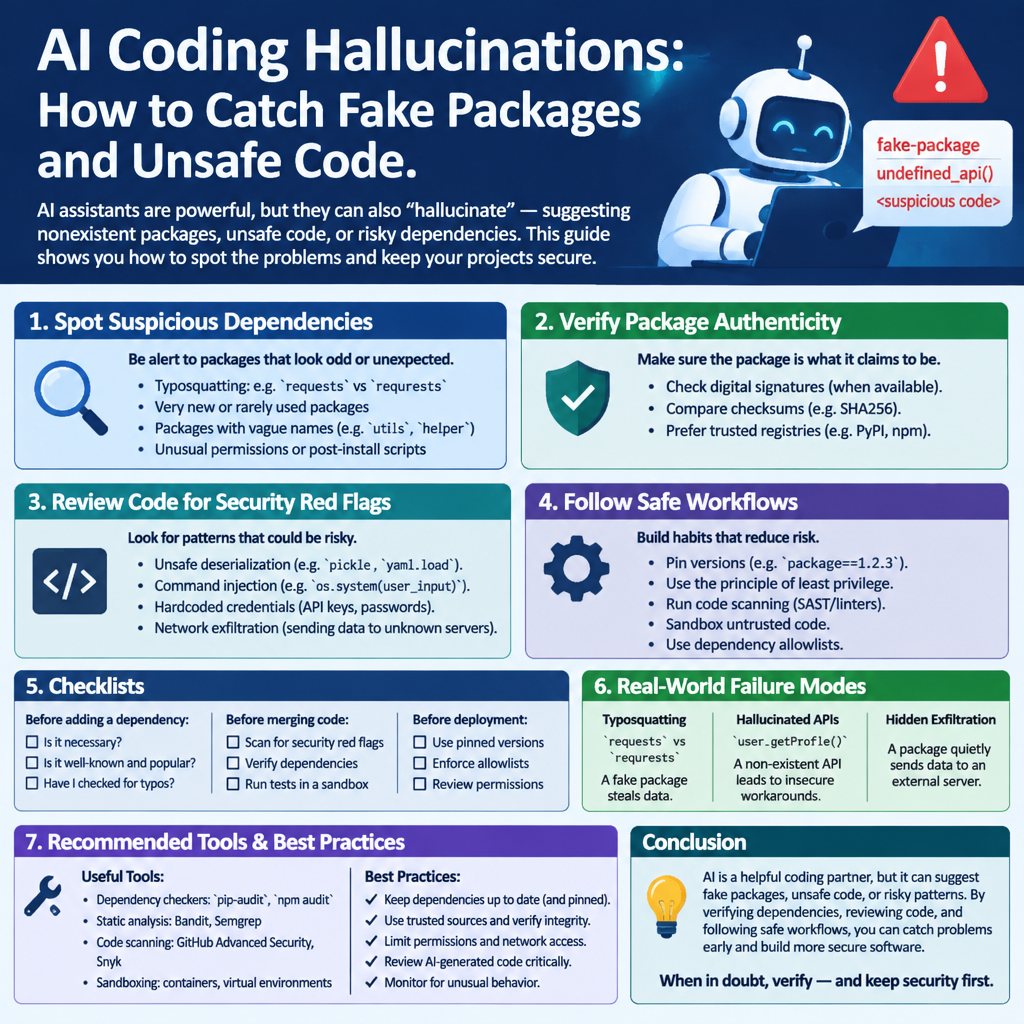
How to Build Guardrails: A Step-by-Step Guide
Guardrails should sit around the entire path from prompt to production. No single scanner can prove a generated answer is correct, so use several checks that fail independently. Here is a practical sequence.
- Set rules for what the assistant may do. Decide whether it can only suggest code or can also edit files, install packages, run commands, or access the network. Keep the default narrow. I prefer starting with read-only or sandboxed access, then granting extra rights only for a task that needs them.
- Verify every suggested dependency. Check the exact package name in the official registry and confirm that it belongs to the expected publisher or project. Review its release history, repository, maintenance signals, and documented purpose. Do not treat a model-generated command as evidence that the package is legitimate. If the project already uses an approved library, prefer that over adding a new one.
- Use a dependency allowlist where it fits. Teams with controlled builds can limit which registries or packages are permitted. An allowlist takes effort to maintain, but it stops a newly invented name from silently becoming an approved dependency. For less restrictive projects, use policy checks and alerts for new packages, direct dependency changes, and unexpected registry sources.
- Review the lockfile and dependency changes. A lockfile records exact dependency versions and helps make builds repeatable; it does not prove that a package is safe. Require reviewers to inspect lockfile changes alongside source changes. Dependency review tools can flag newly added or changed packages, but people still need to judge whether the change belongs in the project. GitHub explains its dependency review feature and what it checks.
- Check APIs against first-party documentation. Verify method names, arguments, defaults, supported versions, and security notes in official documentation. If the answer cites a function or setting, search for that exact name. No result is a reason to stop—not a cue to ask the model to invent a second explanation.
- Test behavior, not just whether code compiles. Add unit and integration tests for expected behavior, invalid input, authorization failures, timeouts, and recovery paths. Static analysis and security linters can catch common mistakes, but they cannot decide whether the design grants too much access or fits the threat model. A green test run is evidence about tested cases, not a universal safety certificate.
- Keep build environments on a short leash. Use least privilege for CI credentials, separate secrets from untrusted jobs, and restrict network access where practical. If a dependency’s install or build step runs, it should not receive broad credentials without a clear need. A sandbox limits the damage if a package or script behaves badly.
- Require a human review for critical paths. Authentication, authorization, cryptography, payment handling, and infrastructure permissions deserve review by someone who understands the risks. Ask reviewers to trace what data enters, what authority the code receives, and what happens when a request fails. OWASP recommends cross-checking model output against verified sources; its broader LLM application security risks help teams frame that review.
- Measure what your tools get wrong. Keep a small set of representative prompts and record whether the assistant invents packages, APIs, or security claims. Re-run the set when the model or system prompt changes. A benchmark will not predict every mistake, but it gives the team a way to notice regressions instead of relying on anecdotes alone.
Retrieval-augmented generation can help by supplying approved documentation or internal references as context. It can reduce reliance on stale training patterns, but it can still retrieve the wrong page, misunderstand a valid page, or make a claim the evidence does not support. Show the source, verify it, and keep the checks above. NIST’s Generative AI Profile offers a broader framework for managing generative AI risks.
AI Coding Assistants vs. Documentation-First Development
The closest alternative to AI-generated code is not one competing product. It is the familiar approach: start with official documentation, package registries, existing examples, code search, and a developer writing or adapting the implementation. Both approaches can fail. The difference is where they save time and where they demand checking.
| Area | AI coding assistant | Documentation-first development |
|---|
| First draft | Fast; can produce a full example from a short prompt | Slower; the developer assembles the code from references |
| Source of claims | Model patterns and the prompt, sometimes with retrieved material | Named documentation, source code, or published guidance |
| Package risk | Can suggest a plausible but nonexistent or unsuitable package | Lower risk of invented names when the registry is checked directly |
| API accuracy | May invent methods or use old signatures | Usually tied to the version of the document being read |
| Security review | Output may sound sure while missing a control | Still depends on the developer understanding the advice |
| Best use | Scaffolding, explanations, test ideas, and routine drafts | Critical behavior, version checks, and decisions that need traceable evidence |
In a real team, the strongest approach combines them. Ask the assistant for options or a first draft, then confirm the package and API in the official source. Keep a link to the documentation or issue that supports a non-obvious security choice. That record helps the next reviewer understand why the code exists, instead of asking them to trust a chat transcript.
Documentation-first work is not magically safe. A developer can misread a page, follow an obsolete tutorial, or copy an insecure snippet. The benefit is traceability: a reviewer can inspect a named source and see whether it matches the project’s version and needs. AI can reduce the time spent searching, but it should not remove that evidence trail.
Frankly, use the assistant where a wrong first draft is cheap to discard. Use verified references and experienced review where an error could expose accounts, data, or production systems. The goal is not to ban a tool; it is to choose the level of trust the task has earned.
Common Mistakes to Avoid
The first mistake is treating fluent output as verified output. A polished answer can still contain fake names, missing checks, and stale guidance. I have seen teams spend longer debating whether generated code “looks right” than checking the claim against its official source. Reverse that order. Verify first, then review style.
The second mistake is checking only whether the code compiles. Compilation establishes that the toolchain accepts the code; it does not establish that the package is safe, the authorization rule is correct, or the data is protected. A test suite may also miss a flaw if it covers only the expected path. Test denied access, repeated attempts, malformed input, and other failure cases that fit the feature.
Third, do not trust package names because they appear in multiple generated answers. Models may repeat a name because similar prompts produce similar patterns. Repetition is not independent confirmation. Check the registry, publisher, source repository, and project documentation. If a dependency has no credible history, pause before installing it.
Fourth, do not let a model make security decisions by convenience. “Give the service broad access so the sample works” is a shortcut, not a reason. Use least privilege and identify the exact action the service needs. Authentication deserves the same care. For higher-assurance sign-in, current guidance favors phishing-resistant methods where practical; NIST’s Digital Identity Guidelines discuss authenticator requirements and the limits of some methods. Passkeys can resist many phishing attacks because the credential is tied to the legitimate site, but account recovery and device security still matter.
Fifth, do not assume retrieval makes the answer true. A system that searches internal manuals can still pick the wrong version or overstate what a page says. Ask for the supporting source, open it, and check that it applies to the code being changed. Retrieval improves the evidence available; it does not replace judgment.
Finally, do not hand the assistant a powerful terminal and hope for the best. Limit permissions, isolate experiments, protect secrets, and inspect proposed commands before running them. Here’s the truth: security habits that apply to human-written code also apply to model-generated code, with extra care around claims that have no clear source.
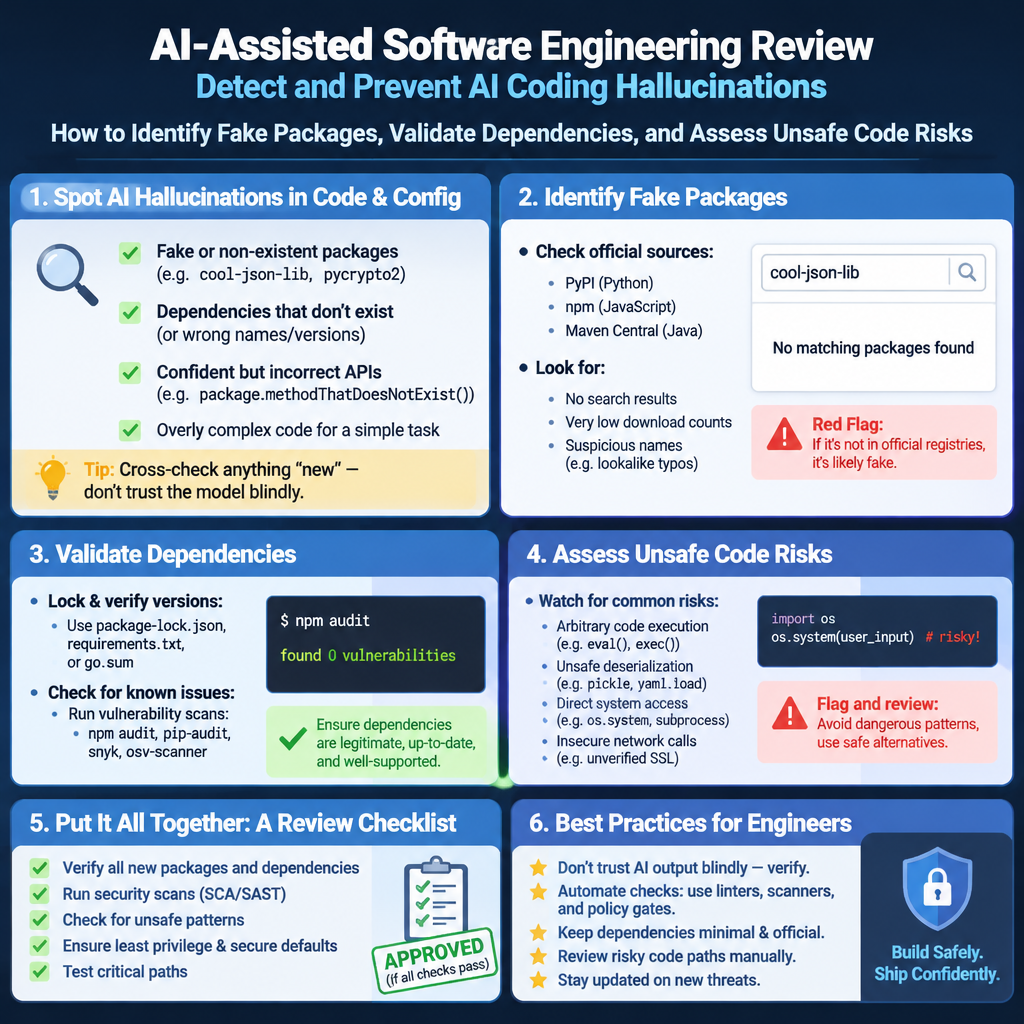
Frequently Asked Questions
What is an AI coding hallucination?
It is a false or unsupported technical claim produced by a coding model and presented as if it were reliable. Examples include an invented package, a nonexistent API method, incorrect documentation, or insecure configuration. The code may look valid or even compile, so verify important claims against a trusted registry, official documentation, tests, and qualified review.
What is slopsquatting?
Slopsquatting is a software supply-chain attack in which someone registers package names that AI coding tools tend to invent. A developer who accepts a generated name may install the attacker’s package instead of a legitimate library. Confirm the exact name and publisher in the official package registry before installing anything, and restrict build permissions so a bad dependency has less access.
How can a team detect fake package suggestions?
Check every new dependency against its official registry and source repository, then review ownership, release history, purpose, and version. Use dependency allowlists or policy checks where suitable, and review lockfile changes with the code. Automated checks can flag unfamiliar packages early, but a human still needs to decide whether the dependency is necessary and trustworthy.
Can retrieval-augmented generation prevent hallucinations?
No. Retrieval can give a model approved documentation or current references to use, which may reduce unsupported answers. But the model can retrieve the wrong material, misread it, or make claims beyond what the source says. Ask for traceable references and verify them. Keep testing, least privilege, and human review for security-sensitive code.
Final Thought
AI coding assistants are useful tools, not authorities. They can help a developer get a first draft onto the screen, explain an unfamiliar API, or suggest tests worth writing. They can also make a fabricated package or weak security pattern look ordinary. The answer is neither blind trust nor reflexive rejection. It is a workflow that checks claims before they acquire permissions.
I still value the minutes saved on repetitive work. I value a verified dependency, a narrow cloud policy, and a careful authentication review more. Those choices protect people who will never see the prompt or the pull request, but who depend on the service being built. Good engineering treats that trust as something to care for, not something to spend casually.
When a model offers a package, verify the package. When it offers a security design, verify the design. When it cannot show a reliable basis for a claim, slow down and check the source yourself. That is not busywork. It is how a fast draft becomes software a team can responsibly maintain.
FAQPage JSON-LD
{"@context":"https://schema.org","@type":"FAQPage","mainEntity":[{"@type":"Question","name":"What is an AI coding hallucination?","acceptedAnswer":{"@type":"Answer","text":"It is a false or unsupported technical claim produced by a coding model and presented as if it were reliable. Examples include an invented package, a nonexistent API method, incorrect documentation, or insecure configuration. Verify important claims against a trusted registry, official documentation, tests, and qualified review."}},{"@type":"Question","name":"What is slopsquatting?","acceptedAnswer":{"@type":"Answer","text":"Slopsquatting is a software supply-chain attack in which someone registers package names that AI coding tools tend to invent. A developer who accepts a generated name may install the attacker’s package instead of a legitimate library. Confirm the exact name and publisher in the official package registry before installing anything."}},{"@type":"Question","name":"How can a team detect fake package suggestions?","acceptedAnswer":{"@type":"Answer","text":"Check every new dependency against its official registry and source repository, then review ownership, release history, purpose, and version. Use dependency allowlists or policy checks where suitable, and review lockfile changes with the code. Automated checks can flag unfamiliar packages early, but a human still needs to decide whether the dependency is necessary and trustworthy."}},{"@type":"Question","name":"Can retrieval-augmented generation prevent hallucinations?","acceptedAnswer":{"@type":"Answer","text":"No. Retrieval can give a model approved documentation or current references to use, which may reduce unsupported answers. But the model can retrieve the wrong material, misread it, or make claims beyond what the source says. Verify references and keep testing, least privilege, and human review for security-sensitive code."}}]}