AI Coding Hallucinations: How to Catch Fake Packages and Unsafe Code
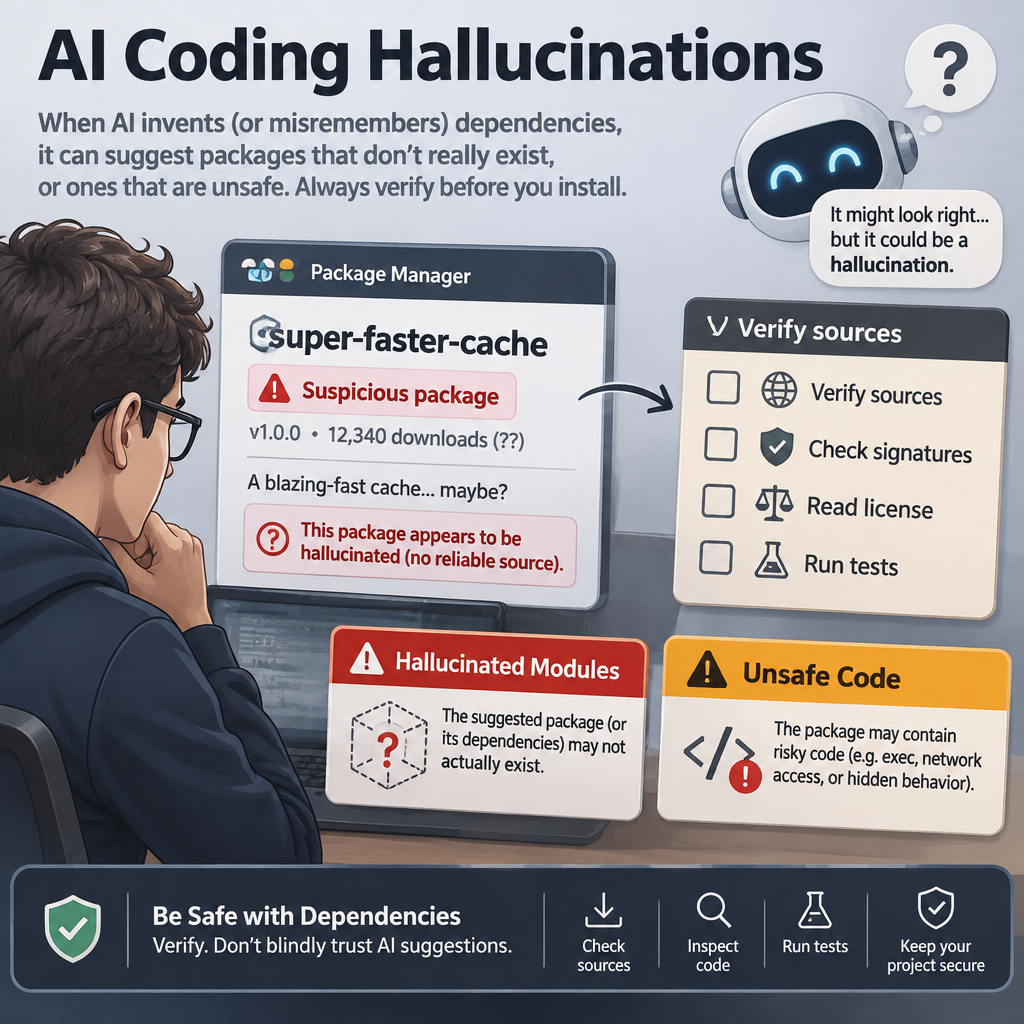
AI coding hallucinations are confident-looking but false outputs from a code-generating model. They can include invented package names, made-up functions, or outdated security advice, and because the code may look polished, teams need checks that verify suggestions before they enter a build or protect real accounts.
Key Takeaways- A plausible answer is not proof that a package, function, or security pattern is real.
- Fake dependency names can become a supply-chain risk if attackers register them.
- Review AI-generated code with automated checks and human expertise, especially around security.
- Track mistakes and keep controls in the build pipeline, not just in a reviewer’s memory.
I’m Ernie Castro, a Filipino software engineer in Seattle. In my work, I treat code assistants as useful drafting tools, not trusted authorities. That distinction matters: the assistant can save time on routine code, but its fluency can also hide a bad assumption. The goal is not to ban these tools. It is to keep their speed from outrunning the checks that protect users, data, and the people who depend on our software.
What Are AI Coding Hallucinations?
An AI coding hallucination is an answer that a model presents as useful or factual but that is wrong, invented, or unsupported. In code, that might be a package that does not exist, a function with a fabricated signature, or a security recommendation that no longer fits current guidance. The model’s confident tone does not tell you which parts are sound.
Most language models generate text by predicting likely next tokens from patterns learned during training. They do not automatically check a package registry, test a claim against current documentation, or understand that a polished answer can still be false. If a prompt leaves a gap, the model may fill it with a pattern that sounds right. Sometimes it is right. Sometimes it is a convincing guess.
Code makes that guess harder to spot. Library names often follow familiar naming rules, so an invented one can look ordinary. A function signature can match the style of a real SDK while still being wrong. If the snippet is syntactically valid, a quick review may miss the problem; if it compiles, the team may grow even more comfortable with it. Passing a build is useful evidence, but it is not proof of safe behavior.
Researchers studied package suggestions from 16 code-generating models and reported that about one in five recommended dependencies in their test set did not exist. Their study described more than 205,000 unique fabricated package names. Those are results from a specific research setup, not a universal rate for every model or team. Still, they show why package suggestions deserve verification. Read the study, We Have a Package for You, before assuming autocomplete only saves typing.

One risk is package hallucination: a model invents a dependency that resembles a real library. If someone registers that name on npm or PyPI, a later install can fetch code controlled by an attacker. Researchers call this attack pattern slopsquatting. It borrows the logic of typosquatting, but the package name comes from a model’s repeated suggestion rather than a developer’s typing mistake. A fabricated name is not automatically malicious; the danger appears when a hostile party claims it and a project installs it.
Other hallucinations affect security advice directly. A model may recommend weak authentication, an obsolete cipher, or cloud permissions broader than the task needs. The answer may include a tidy explanation, but tidy prose is not a security review. Treat each claim as something to test against trusted documentation and your own threat model.
Why These Errors Matter—and Where Assistants Help
AI assistants can make development work faster. They can draft repetitive tests, explain unfamiliar code, suggest a starting point for a small utility, or help turn a clear requirement into a first implementation. Those are real benefits when the work is checked. A draft is cheaper to review than a blank screen, provided the reviewer knows it is a draft.
Here’s the kicker: speed can hide risk. The model can produce more code and more dependency suggestions than a reviewer can carefully inspect line by line. A team may see a neat patch, a green build, and a familiar-looking package name, then assume that the difficult thinking has already happened. It has not. The model has supplied text; the team still owns the result.
In a familiar review scenario, an assistant proposes a small helper package to parse a file format. The name looks sensible, the import reads cleanly, and the developer adds it before checking the registry. A registry check would reveal that the package is new, unrelated, or absent. If the name is already controlled by an attacker, the project could execute untrusted installation code. The useful lesson is simple: verify a dependency before trusting its name, not after it becomes part of a release.
The same care applies to identity and access. An assistant might produce an authentication example that relies on SMS codes without explaining their limits, or grant a cloud service permissions it does not need. For important accounts, current security guidance favors phishing-resistant methods such as passkeys where they fit the system. The FIDO Alliance’s passkey overview explains how passkeys use public-key cryptography and resist common phishing attacks. That does not mean every project can adopt them overnight; it does mean an old pattern should not pass as current simply because the model wrote it confidently.
I look at these tools as a matter of stewardship. Software teams hold access to user accounts, private information, and business systems in trust. Good engineering means using that access carefully, minimizing permissions, and testing changes before they affect people. An assistant can help with the work, but it cannot take responsibility for the consequences.
The most useful balance is neither blind trust nor blanket rejection. Let assistants handle low-risk drafts, then put checks around dependencies, permissions, authentication, and cryptography. Keep a human reviewer on security-sensitive changes. The tool can contribute speed; the team must supply judgment.
How to Add Guardrails, Step by Step
- Set rules for what the assistant may change. Start by sorting work by risk. A suggestion that formats a log message is not the same as code that changes login, payment, encryption, or cloud access. Require stricter review for high-impact areas, and make the rule clear in the team’s code-review process. A simple boundary is better than a vague reminder to be careful.
I use a practical test: if a mistake could expose private data, let an unauthorized user in, or change who can access a system, the output needs a specialist review. Do not let a tool quietly expand its own authority. Keep changes small enough that reviewers can see what changed and why.
- Check each suggested dependency against a trusted registry. Before installing a package, verify its exact name, registry, maintainer information, release history, and purpose. A familiar spelling is not enough. Confirm that the package actually provides the feature the code needs, and look for a well-maintained alternative if its history is thin or unclear.
Do not let an AI-generated command run directly in a privileged build environment. Use approved registries where practical, restrict who can add new dependencies, and flag new packages for review. A registry allowlist can help for projects with a stable dependency set, though it needs a process for safe updates. The goal is not to freeze useful work; it is to make each new dependency a deliberate choice.
- Lock and review resolved versions. Use a lockfile so builds use known dependency versions rather than silently pulling whatever is newest. Review lockfile changes in the same code review as the source change. Check transitive dependencies too: the package you chose can bring in other code, and that code also becomes part of your project’s supply chain.
Automated dependency review can point out newly added or changed packages. Combine it with vulnerability scanning and a clear update policy. These checks do not prove a package is harmless, but they make unexplained changes easier to catch. The NIST Secure Software Development Framework offers practices for building security into development rather than leaving it to the last minute.
- Test security behavior, not just syntax. A successful build says the program can compile or run under particular conditions. It does not prove that a login flow resists phishing or that an access policy grants only the needed permissions. Write tests for expected behavior, check negative cases, and examine what happens when inputs are missing, malformed, or hostile.
For generated authentication code, verify the full flow: enrollment, recovery, session handling, rate limits, and account changes. For cloud policies, compare each permission with the task the service must perform. For cryptography, use current, vetted libraries and established protocols instead of accepting a custom design from a chatbot. Ask a qualified reviewer when the stakes are high.
- Ground answers in documentation you trust. If your assistant supports retrieval from approved sources, connect it to the documentation your team maintains and the official documentation for the libraries you use. Retrieval-augmented generation can give a model relevant material at answer time. It helps reduce unsupported guesses, but it does not guarantee that the model interpreted the material correctly or that the documents are current.
Ask for the relevant source and verify it yourself. A citation that looks real may be outdated, misread, or unrelated. The OWASP guidance on misinformation recommends treating misleading output and overreliance as security concerns. Keep a human in the loop for critical paths, and make the reviewer check the underlying evidence rather than the confidence of the explanation.
- Measure failures and tune the process. Record how often generated dependencies are missing, how many suggestions need security fixes, and which checks catch them. Do not collect more data than you need or use the numbers to punish people for reporting problems. The point is to spot patterns and improve controls.
Start with a small sample of AI-assisted changes. Track false package names, unsupported APIs, risky permissions, and outdated security patterns. Then adjust prompts, approved tools, and pipeline checks based on what actually happens. NIST’s Generative AI Profile gives organizations a structured way to consider risks from generative AI. A short feedback loop beats a grand policy that nobody checks.
Comparison Table: AI-Assisted Code vs. Human-Written Code
AI-assisted code and conventional human-written code can both contain bugs. The important difference is not that one is safe and the other is dangerous. It is how each kind of work enters the codebase, what evidence supports it, and whether the review process can keep up with the speed of production.
| Area | AI-assisted code | Conventional human-written code |
|---|
| How suggestions are formed | Generated from learned patterns and the prompt; may include plausible but unsupported details. | Written from a developer’s knowledge, tools, and available documentation; can still reflect mistakes or stale knowledge. |
| Dependency risk | May propose a convincing package name that has not been verified. | May introduce a typo, an unnecessary package, or a dependency chosen without enough review. |
| Review challenge | High output volume and polished wording can create false confidence. | Context and authorship may be easier to discuss, though reviewers can still miss problems. |
| Best first check | Confirm the package, API, and security claim against trusted sources. | Check the same facts; review the design, tests, and dependency choices. |
| Main safeguard | Automated verification plus human review matched to risk. | Automated verification plus human review matched to risk. |
Frankly, neither column gets a free pass. Human developers also copy outdated examples, misread documentation, or add permissions to make a test pass. An assistant can repeat those same mistakes at a higher pace and with less visible uncertainty. Conversely, a developer who uses an assistant carefully may produce a safer patch than someone who works from memory and skips tests.
The relevant comparison is not machine versus human; it is unchecked output versus verified work. For either source, check dependency identity, lock changes, run tests, inspect security-sensitive logic, and make sure the person approving the change understands its effect. The OWASP misinformation guidance is useful here because it focuses attention on false or misleading output and the danger of relying on it without review.
The best team process assumes that every contributor can be wrong, whether the contributor is a person or a model. That is not cynicism. It is a practical way to protect the people who use the software. Make the checks routine, and a fast first draft becomes useful instead of risky.
Common Mistakes to Avoid
Mistake 1: Trusting code because it compiles. Compilation catches some errors, not every bad assumption. A fake dependency might compile after installation; an access policy might be valid syntax but far too broad. I treat a green build as one signal, not the finish line. Test behavior and review what the program is allowed to do.
Mistake 2: Assuming invented packages are random and harmless. Research indicates that some fabricated package names recur in model output. That makes name registration a potential attack path: an attacker could register a name that a model keeps recommending and wait for an install. Not every hallucinated name will be used, and not every package is malicious, but neither fact makes unverified installation safe.
Mistake 3: Asking the model to certify its own answer. A second prompt can help find possible issues, but the same model may repeat the same false claim or invent a citation to support it. Ask for evidence, then check the evidence independently. Use official documentation, established standards, and trusted registries rather than another confident paragraph from the same tool.
Mistake 4: Treating a broad allowlist as permanent protection. An allowlist helps only if someone reviews changes and removes packages that are no longer needed. A trusted package can be compromised, abandoned, or replaced with a risky version. Keep dependency review, version controls, and monitoring in place. No single control deserves blind trust.
Mistake 5: Fixing the prompt while ignoring the pipeline. Better prompts can make suggestions more useful, but they cannot turn a model into a reliable registry or security authority. A prompt saying use safe packages does not verify the package name. Put checks in the build and review process, where they can run consistently even when a developer is tired or busy.
Mistake 6: Giving every AI-generated change the same review. A spelling suggestion and a new authentication system do not carry equal risk. Review depth should match the effect of the code. For identity, encryption, payment, private data, and cloud permissions, require explicit evidence and a reviewer who can assess the design. That is a better use of scarce expertise than asking specialists to inspect every harmless formatting change.
Mistake 7: Measuring only productivity. Faster code generation is useful, but it is not the only result that matters. Track rework, security fixes, dependency surprises, and time spent checking output. If the team saves ten minutes drafting and loses an hour tracing an invented API, the tool has not helped that task. Use measurements to improve the process, not to sell a story about effortless gains.
Frequently Asked Questions
What is an AI coding hallucination?
It is a generated answer that appears plausible but contains false or unsupported details. Examples include a made-up package, a nonexistent method, an incorrect explanation of an API, or security advice that does not fit current practice. Since the output can be fluent and syntactically correct, check it against trusted documentation and test it rather than judging by tone.
What is slopsquatting?
Slopsquatting is a supply-chain attack that takes advantage of package names hallucinated by code-generating models. An attacker may register a fabricated name on a package registry; if a developer later installs that name, the project could receive attacker-controlled code. Verify the exact package and publisher before installation, and review new dependencies in your normal process.
Can AI coding assistants be used safely?
They can be useful when teams treat their output as untrusted until checked. Use them for drafts and routine work, verify dependencies and APIs, run tests, and require expert review for security-sensitive changes. Keep automated controls in the pipeline. No prompt can guarantee correct output, so safe use depends on the surrounding process.
How should I check AI-generated authentication or cryptography code?
Compare the design with current, authoritative guidance and use established libraries and protocols. Check the complete flow, including recovery, session handling, permissions, and failure cases. For important accounts, consider phishing-resistant authentication such as passkeys where it fits the system. Do not accept a model’s explanation as proof; ask a qualified security reviewer to assess high-impact changes.
Final Thought
AI coding assistants can shorten the distance between an idea and a first draft. They cannot remove the duty to check what that draft does. A package name that sounds ordinary may be invented, a clean authentication example may be outdated, and a valid cloud policy may grant far too much. These are ordinary engineering risks delivered with unusual speed.
I’m glad to use tools that reduce tedious work, but I want the important checks to happen whether I remember them or not. Verify new packages, lock dependency versions, test security behavior, and send sensitive changes to people who know how to assess them. Keep the process plain enough that the whole team can follow it. The aim is not suspicion for its own sake; it is responsible care for the users whose data and time we hold in trust.
Let the assistant draft. Let evidence decide. That is how a team keeps the speed without handing its judgment to autocomplete.