AI Coding Hallucinations: How to Catch Fake Packages and Unsafe Code
AI coding hallucination is a plausible-looking code answer that contains invented facts, APIs, packages, or unsafe advice. The danger is not that the code looks broken; it may compile, pass a shallow test, and quietly install untrusted code or weaken an account boundary before anyone notices.
AI assistants can save time on routine code, explain unfamiliar libraries, and draft tests. But a fluent answer is not proof of a true answer, and a clean compile only proves that a compiler accepted the syntax. In my engineering work, I have learned to separate speed from trust: a suggestion may be useful as a starting point while still needing the same checks as code from an unknown contributor.
This matters most when generated output touches dependencies, authentication, cryptography, cloud permissions, or build automation. The practical goal is not to ban every assistant. It is to keep quick suggestions from gaining powers they have not earned. Here is how to spot the risks and put checks where they belong.
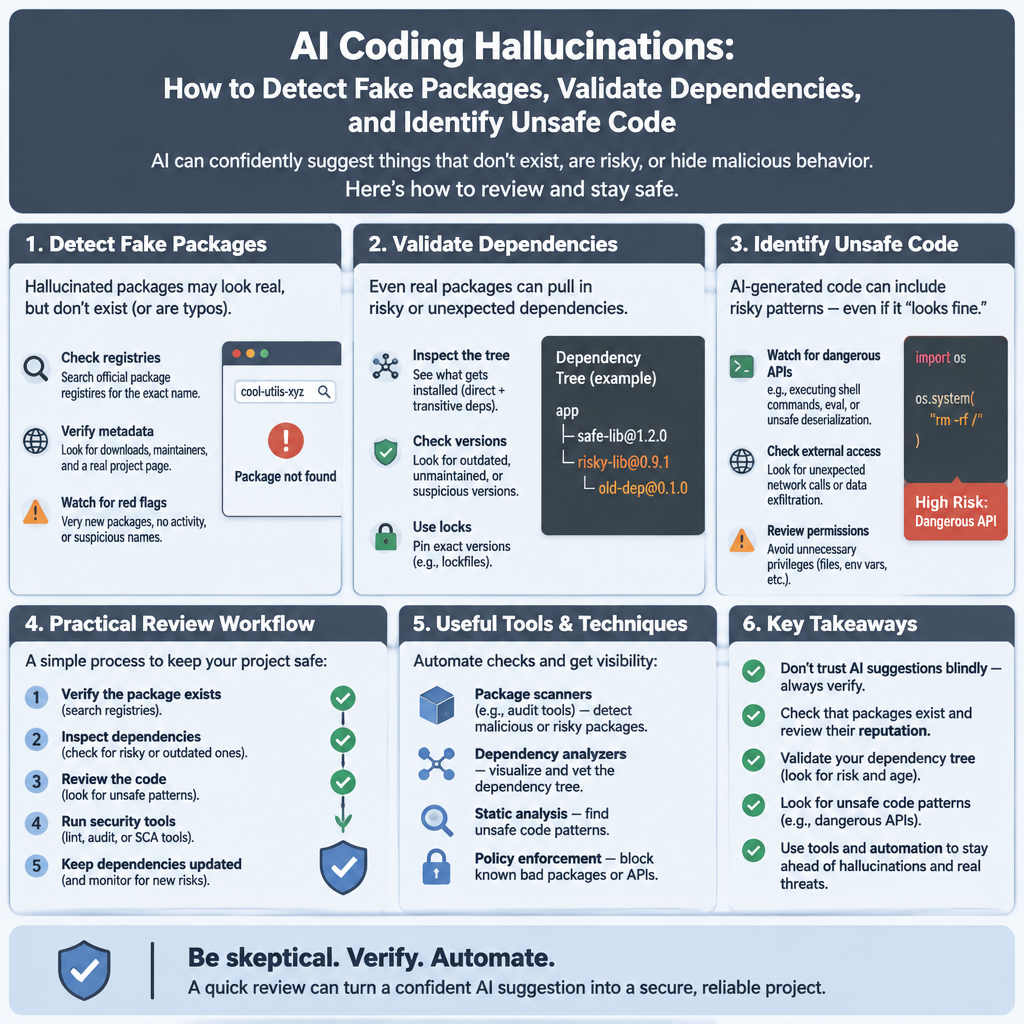
What Is an AI Coding Hallucination?
An AI coding hallucination occurs when a model gives a confident answer that is unsupported or false. It may invent a package, describe an API that does not exist, cite a made-up option, or recommend a security pattern that no longer fits the job. The answer can look polished because the model has learned how real code and technical explanations tend to look.
Most language models predict likely next pieces of text from patterns in their training data and the prompt. They do not automatically check a live package registry or prove that a method exists. When the prompt asks for something outside the model’s reliable knowledge, it can fill the gap with a plausible guess. That guess may use the right naming style, indentation, and comments. Does that make it correct? No.
Code makes this problem harder to spot than a plainly wrong paragraph. A fake library can follow normal naming rules. An invented function can look exactly like a real SDK method. A sample may compile if the invented code is tucked behind a path that tests never run. In a pull request, reviewers often face a long list of familiar-looking changes, and familiar-looking is not the same as verified.
It helps to separate three kinds of trouble. A hallucination is an unsupported or invented claim, such as a nonexistent dependency. A security defect is real code used in an unsafe way, such as weak access control. A plain bug is incorrect behavior that may have nothing to do with security. These can overlap, but the fix differs: verify facts, review security design, and test behavior.
One published study examined 16 code-generating models and reported that about one in five suggested package names in its test set did not match real packages. The researchers counted more than 205,000 distinct fabricated package names across their experiments. That result is a warning, not a prediction for every model or prompt; the study’s conditions matter. Its research paper is worth reading before repeating the number as a universal rate.
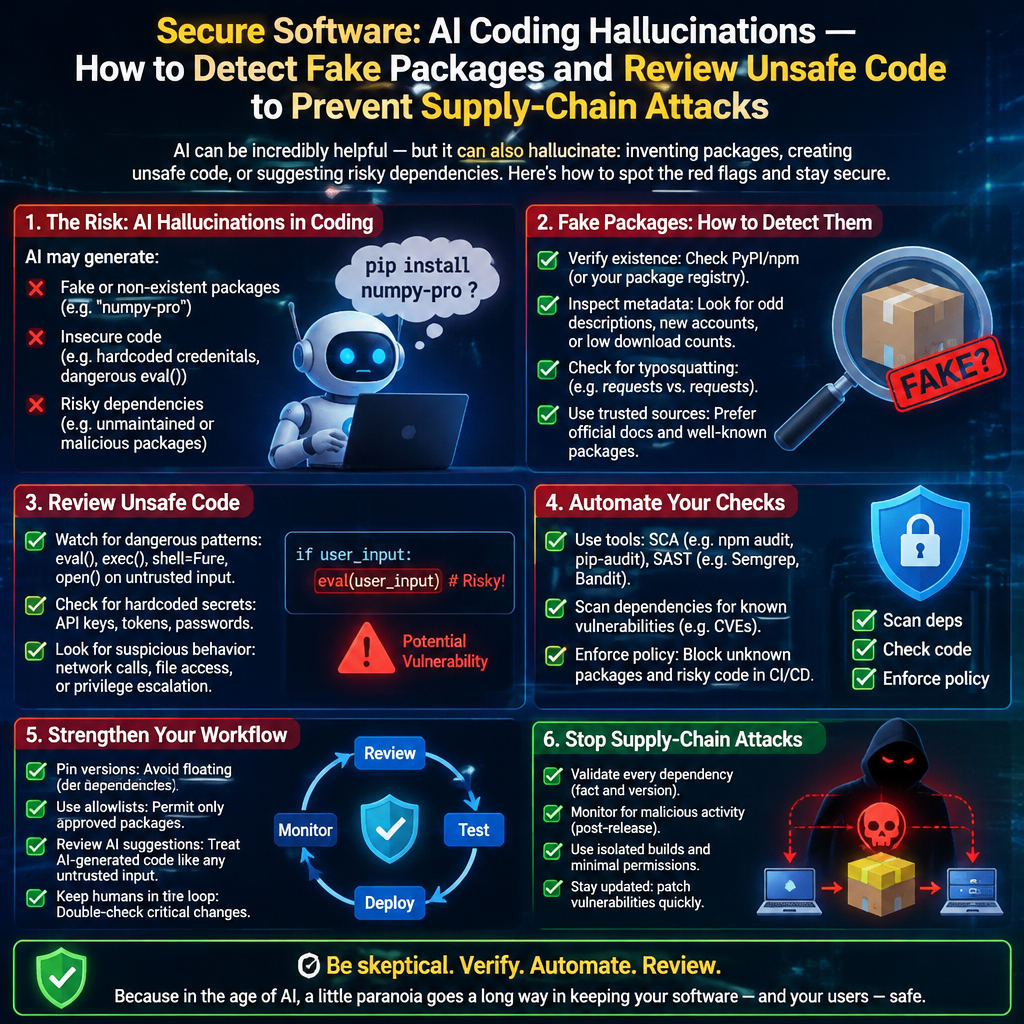
The package problem has a name: slopsquatting. An attacker watches for invented package names, registers one in a public registry, then waits for a developer to install it. The installer may run attacker-controlled code with the permissions available to the developer or build agent. Researchers have also found that hallucinated names can recur, which gives an attacker a more useful target than a one-off typo. A useful explanation of the term appears in Python security expert Seth Larson’s writing.
Core Benefits and Why the Risk Matters
AI assistants can be useful. Frankly, the point is to keep the useful parts while refusing to confuse fast output with trusted output. A tool that drafts a test or explains a block of code may save a developer time, provided the developer still checks important claims.
- Faster first drafts. An assistant can sketch a parser, generate test cases, or show the shape of an unfamiliar API. I use a simple rule in code review: a draft can save typing, but it does not get a free pass on correctness. The person accepting it still owns the change.
- A second way to explore a problem. Asking for alternatives can reveal edge cases or prompt a useful question about input validation. Treat the response as a list of ideas, not as a verdict. The value is often in the questions it raises.
- More attention for high-value work. If a developer spends less time on repetitive scaffolding, that time can go toward design, testing, and review. That benefit disappears when the team spends its saved time cleaning up an unverified package or a weak security pattern.
- Clearer onboarding. An assistant can explain a code path in plain language, which helps a new team member learn a system. But a confident explanation can also misstate what the code does. Check it against the source and tests before using it as documentation.
- A chance to improve repeatable checks. A team can record which suggestions were wrong and use that information to improve prompts, templates, and automated checks. That is more useful than arguing about whether AI is good or bad in the abstract.
Here is a review-room example I use to make the risk concrete. Picture a change that adds an unfamiliar dependency to handle token validation. Its name fits the ecosystem, the code compiles, and the description says it prevents replay attacks. A reviewer checks the diff quickly and approves it. The missing step is basic: nobody checked whether the package exists, who maintains it, or whether it does what the description claims.
That scenario is illustrative, but the failure path is real. A package manager may execute install scripts, and a continuous integration agent may hold access to source code, cloud services, or release credentials. One invented name can therefore become a supply-chain problem rather than an embarrassing typo. That is why responsible engineering includes stewardship of shared systems and other people’s data.
The same caution applies to security advice. A model may offer an authentication flow with SMS codes, suggest an old cipher, or write an overly broad cloud policy. The answer may sound reasonable because it resembles a pattern that appeared in old examples. For important accounts, standards bodies and security groups advise using phishing-resistant authentication where practical; the current NIST digital identity guidance explains authentication requirements and authenticator types. The right design still depends on the service and its threat model.

Step-by-Step Guide to Reducing Hallucination Risk
No single prompt can make a model reliable. Put checks in the workflow instead. The following steps work whether a developer uses an assistant in an editor, a chat window, or an automated code-generation service.
- Mark generated changes clearly. Make it easy for reviewers to see which files or sections came from an assistant. Some teams use pull request notes; others ask contributors to state where AI helped. This is not about blame. It helps reviewers focus on generated dependencies, security-sensitive logic, and unfamiliar APIs instead of guessing which code needs extra scrutiny.
- Verify every dependency before installation. Search the official registry for the exact package name and ecosystem. Check the publisher, repository link, release history, documentation, and whether the package has a plausible track record. Look for a name that differs by one character from a well-known package. Do not run an install command merely because a model gave it to you. A registry match is only the first check; a real package can still be malicious or unsuitable.
- Use a trusted source of package facts. Teams can maintain approved package lists for sensitive services, pin known versions, and block unapproved registries. A lockfile records exact dependency resolutions, but it does not prove a package is safe. Review new lockfile entries, transitive dependencies, install scripts, and version changes. Keep software composition analysis in the build so known vulnerable or disallowed packages are caught consistently.
- Keep the first test run isolated. Run unfamiliar code in a disposable container or sandbox with no production secrets, minimal network access, and limited file permissions. That reduces the damage if a package or script behaves badly. Build agents should use short-lived, narrowly scoped credentials where possible. A model’s suggestion should never receive more authority than an unknown patch from an outside contributor.
- Check security advice against trusted guidance. For authentication, authorization, cryptography, and cloud permissions, compare the generated design with current standards and vendor documentation. Ask what the code protects, who can access it, and what happens when a request fails. For cloud access, start with least privilege and remove permissions that the task does not need. For cryptography, use maintained libraries and documented defaults rather than inventing a scheme from scratch.
- Test behavior, not just syntax. Compile the code, but do not stop there. Add tests for denied access, expired credentials, malformed input, replayed requests, and failure states that fit the feature. Review whether tests actually exercise the security branch. A green test suite can still miss a dangerous path if its cases only cover the happy route.
- Use documentation retrieval carefully. A tool that retrieves current, approved documentation can reduce guesses about APIs and policy. This approach is often called retrieval-augmented generation. It can ground a response in sources your team controls, but it does not make the response automatically true. Check that the cited page is current and that the code matches it. A model can misread a correct source or combine facts from unrelated pages.
- Measure your own results. Track invalid package suggestions, unsupported API calls, security findings, and reviewer corrections. Record the model, task type, and date so a change in tools can be compared fairly. Published studies offer a starting point, not a substitute for local evidence. The NIST AI Risk Management Framework describes a risk-based approach for managing AI systems; its core lesson is simple enough for coding teams: name the risk, measure it, and assign someone to manage it.
- Keep a human accountable for critical changes. A reviewer should understand the feature well enough to explain why the code is safe, not just why it passes a test. Set extra review requirements for identity checks, payment handling, private data, deployment scripts, and permission changes. The NIST Secure Software Development Framework provides useful practices for building security into development rather than bolting it on at release time.
Comparison: AI-Assisted Coding vs. Human-First Coding
The closest competitor to AI-assisted coding is conventional, human-first development. Neither approach guarantees safe software. People make mistakes too, and a developer can copy a bad answer from a forum without an AI tool in sight. The difference is where the suggestions come from, how quickly they arrive, and how easily a weak pattern can be repeated.
| Area | AI-assisted coding | Human-first coding |
|---|
| Speed of first draft | Often quick for routine code and examples | Depends on developer familiarity and task size |
| Package suggestions | May produce plausible names that need registry checks | Usually comes from known project experience, but still needs verification |
| API accuracy | Can invent methods or combine versions | Can misremember APIs; documentation checks still matter |
| Security reasoning | May sound certain while missing context or current guidance | Depends on skill, review, and access to current references |
| Repeatability | Similar prompts can repeat the same bad suggestion | Team conventions can repeat known mistakes too |
| Best safeguard | Automated verification plus informed review | Automated verification plus informed review |
This is a qualitative comparison, not a measured scorecard. The research on package hallucinations shows why generated package names deserve special attention, but it does not prove that every AI-assisted pull request is riskier than every human-written one. The practical point is narrower: teams should add checks for the failure modes their tools can create, while keeping ordinary software controls for human code as well.
I have found that reviewers do their best work when they have a short, clear checklist instead of a vague warning to be careful. Verify new packages. Check security-sensitive logic against a current source. Run the tests that cover failure cases. Those steps help regardless of who typed the first draft.
Common Mistakes to Avoid
Most advice says to review the output carefully. That sounds sensible, but it is too vague to change behavior. Here are the mistakes that keep showing up when teams adopt coding assistants without changing their checks.
- Trusting confident language. A detailed explanation can still be wrong. Ask for evidence, then check the claim in the registry, source code, or official documentation. A citation from the assistant is a lead, not proof.
- Treating compilation as a security review. Compilers catch many syntax and type errors. They do not tell you whether a package is controlled by an attacker, whether a permission is too broad, or whether authentication can be phished. Tests and static analysis help, but they do not replace a review of the design.
- Installing a suggested package before checking it. This reverses the safe order. First confirm the exact package and its publisher. Then review its history and behavior. Only after that should it enter a project, preferably in an isolated environment with limited privileges.
- Asking the model to verify its own answer. It may notice an error, which is useful, but the same system can confidently miss it twice. Use a separate source of truth: a registry, vendor documentation, a standards document, or a reviewer with relevant experience.
- Assuming a real package is a safe package. Registry presence does not establish good maintenance, sound code, or a trusted owner. Check package health and risk, and consider whether the dependency is needed at all. The safest package can be the one the project does not add.
- Relying on one overworked reviewer. Human review matters, but attention is limited. Put routine checks in automation, then use reviewers for choices that need context. This is the kicker: if every safeguard depends on someone noticing one odd line after a long day, the process is not much of a safeguard.
- Giving build agents broad access. A package install or test run should not have production access by default. Limit secrets, network routes, and permissions. The smallest practical access reduces harm when a dependency or script turns out to be unsafe.
- Banning the tool instead of fixing the workflow. A ban may be right for a restricted system, but it does not stop people from using other sources of questionable code. For ordinary development, define acceptable use, protect sensitive data, and enforce dependable checks. Rules work better when teams can follow them without hiding their work.
The truth is that no control makes hallucinations disappear. Layered controls make the chance of an unnoticed mistake smaller and limit its impact. The OWASP guidance on risks in large language model applications is a useful reminder that misinformation and unsafe output need explicit controls, not wishful thinking.
Frequently Asked Questions
Do AI coding hallucinations always produce code that fails?
No. A fabricated package or function might fail immediately, but it may also look plausible, compile, or remain hidden in an untested branch. Some hallucinations produce a real API name with the wrong behavior or a security pattern that is outdated. Check the underlying claim, not only whether the program runs. A working build is useful evidence about syntax and integration; it is not proof that a dependency is trustworthy or that access controls are sound.
How can I check whether an AI-suggested package is real and safe?
Search for the exact name in the official registry for that language, then check its owner, repository, release history, documentation, and dependency tree. Confirm that the package is the one you meant to use and not a lookalike. Review install scripts and run unfamiliar code in a sandbox without valuable credentials. Registry presence confirms that a name is registered; it does not certify the package as safe.
Is it safe to use AI-generated code in production?
It can be, if the code goes through the same engineering controls as other production code, with added attention to dependencies and unsupported claims. Use tests, code review, dependency scanning, least-privilege build agents, and trusted documentation. Review authentication, cryptography, private data, and cloud permissions with someone who understands those areas. Do not ship code just because an assistant wrote it quickly or explained it clearly.
Should every service replace SMS codes with passkeys?
Not automatically. Passkeys provide phishing-resistant sign-in and can be a strong choice for accounts where the risk warrants them. A service still needs recovery options, accessibility support, and a plan for lost devices. SMS codes have weaknesses, including phishing and phone-number takeover risks, so they should not be treated as the strongest option for high-risk accounts. Match the method to the account, users, and threat model; consult current guidance such as NIST’s digital identity standard and FIDO Alliance passkey information.
Final Thought
AI coding assistants can produce useful drafts, but a useful draft is still a draft. I would rather see a team adopt a few boring controls than hold another argument about whether the tool is clever. Check the package. Pin the version. Limit the build agent. Test denied access as carefully as allowed access. Put a person with the right knowledge on changes that could expose someone’s account or data.
I have spent enough time around software teams to know that good intentions do not catch every defect. Clear ownership and repeatable checks do more. That is not a rejection of new tools; it is respect for the people who depend on the services we build. Technical skill is something to steward, and speed matters only when the result serves users without placing them at needless risk.
The most reliable workflow is not the one that trusts every suggestion or refuses every suggestion. It is the one that makes important claims earn their place in the codebase. Build those checks into everyday work, and assistants can help with the typing without taking over the responsibility.