AI coding hallucinations are plausible but false outputs from a code model, including invented packages, wrong APIs, and unsafe security advice. Because the...
AI Coding Hallucinations: How to Stop Fake Packages and Unsafe Code
AI coding hallucinations are plausible but false outputs from a code model, including invented packages, wrong APIs, and unsafe security advice. Because the code can look polished and even compile, teams should treat every suggestion as untrusted until a registry check, test, and qualified review confirm it. Speed is not proof.
Key Takeaways- AI code can be fluent and still be wrong.
- A made-up dependency can become a supply-chain risk if an attacker registers it.
- Passing tests or compiling does not prove code is secure.
- Check packages, versions, permissions, and security logic before merging.
- Use AI as a drafting tool, not as the final reviewer.
The useful question is not whether an AI assistant makes mistakes. It does. The useful question is whether your engineering process catches those mistakes before they reach a build, a customer, or a production system. I have seen a clean-looking suggestion get less scrutiny than a rushed human change, simply because it arrived with tidy comments and confident reasoning. That is backward.
Researchers studying 16 code-generating models reported that roughly one in five package recommendations in their study referred to packages that did not exist, with more than 205,000 unique fabricated names across the results. The number is a warning, not a prediction for every team or tool; the study’s exact results depend on its models and prompts. Still, the risk is plain: a plausible name can be mistaken for a real dependency. The research paper describes the package-hallucination problem, while OWASP’s guidance for generative AI risks helps frame why confident, incorrect output needs independent checks.
What Are AI Coding Hallucinations?
An AI coding hallucination is code-related output that appears credible but is false, unsupported, or unsafe. A model might invent a library, call a real library with a made-up function, explain an API incorrectly, or offer security logic that does not fit the current threat. The output may be neatly formatted. That changes nothing.
Most code assistants generate text by predicting a likely next token from the prompt and patterns learned during training. If the prompt leaves out a detail, or the model has weak or old information, it can fill the gap with a convincing guess rather than stop and say it does not know. The model is producing likely text, not checking a live registry or proving a claim. Does that distinction matter? Absolutely.
Code can hide the mistake better than ordinary prose. A fake package name can follow the naming style of a popular tool, while a fabricated function can look right beside real calls in the same SDK. A code reviewer may see sensible variable names and a passing build, then miss that the package was never part of the project’s approved dependency set. I have watched reviewers spend more time on formatting than on where a new dependency came from. That is an easy habit to fix.
Hallucinations also come in different forms. There are dependency hallucinations, where a suggested package or module is not real; API hallucinations, where a real library is used in a way it does not support; and security hallucinations, where the assistant produces unsafe authentication, cryptography, or access-control advice. These risks overlap, but they are not interchangeable. A registry check can catch one kind of error and miss another.
A useful test is to ask what independent evidence supports the output. Does the package exist in the right registry? Does the function appear in documentation for the exact version? Does the security design match current guidance and your system’s threat model? Code that compiles has passed a syntax and build test, not a truth test. Frankly, teams need to stop treating polished output as a quality signal.
Why AI Hallucination Risks Matter
AI assistance can save time on routine work. It can draft a test outline, explain a familiar error, or produce a first pass at a small helper function, giving an engineer something concrete to inspect rather than a blank file. That is a real benefit. The important part is keeping the human in charge of acceptance.
The risk grows when people confuse speed with certainty. A made-up dependency may be registered by an attacker on a public package registry such as npm or PyPI. If a developer installs it, the package may run code with the permissions granted to the local machine or build runner. This threat pattern is called slopsquatting: rather than waiting for a developer to mistype a real name, an attacker registers a package name that an AI model is prone to invent. The research on package hallucinations provides evidence that fabricated names can recur across model outputs; that does not mean every invented name has been registered or attacked. It does mean a careless install can hand an outsider a foothold.
The damage is not limited to packages. An assistant may suggest old authentication patterns, weak cryptographic settings, or cloud permissions broader than the task requires. For accounts that matter, current guidance favors phishing-resistant multi-factor methods, including passkeys based on FIDO/WebAuthn, over relying on SMS codes alone. CISA’s phishing-resistant MFA guidance explains why method choice matters. Passkeys are not a cure for every account problem, but they reduce exposure to common phishing and password-reuse attacks.
I once reviewed a change that looked finished because the assistant had supplied a complete login flow, tests, and a confident explanation. The tests checked that the route returned the expected response; they did not check whether a stolen session could be reused or whether the recovery path weakened the main control. We had to widen the review. Here’s the kicker: a test can confirm the behavior you wrote down while ignoring the danger you forgot to ask about.
That is why this issue is about people, not just code style. Software can handle private messages, paychecks, health records, and access to essential services. Protecting those systems is part of respecting the people who rely on them, and it is a basic duty of careful engineering. AI can help with the work, but it cannot take responsibility for its effects. A person still has to judge what is safe to ship.
Step-by-Step: How to Guard Your Pipeline
A few checks can stop many bad suggestions. The trick is to put them where developers already work, instead of adding a long manual checklist nobody follows. Here is a practical process that fits a normal pull request and build pipeline.
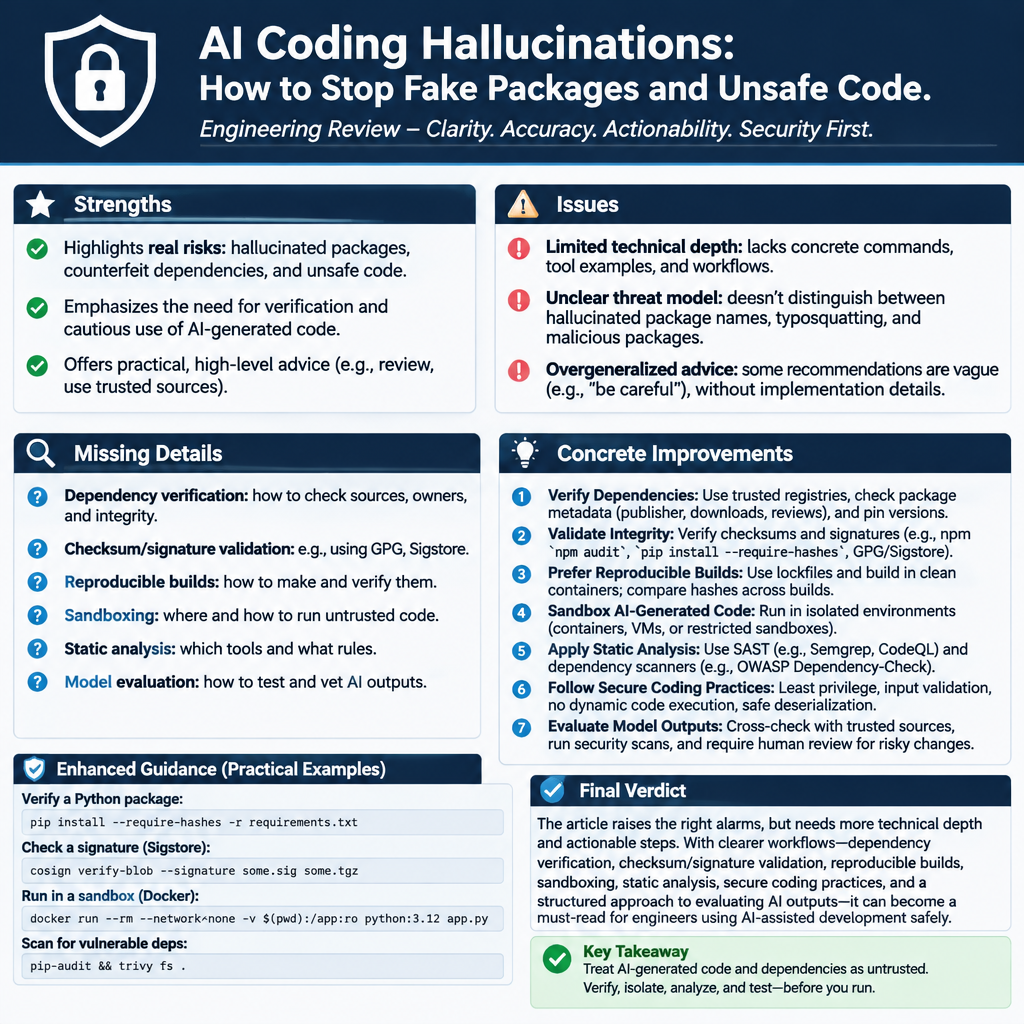
- Classify the change before asking for code. Mark changes involving authentication, authorization, cryptography, personal data, payment, or production access as high risk. Tell the assistant what language, framework, version, and approved libraries it may use. A narrow prompt will not make the answer correct, but it reduces needless guessing. Would you let a new employee change access controls without saying which system they are working on? Give the model that same basic context.
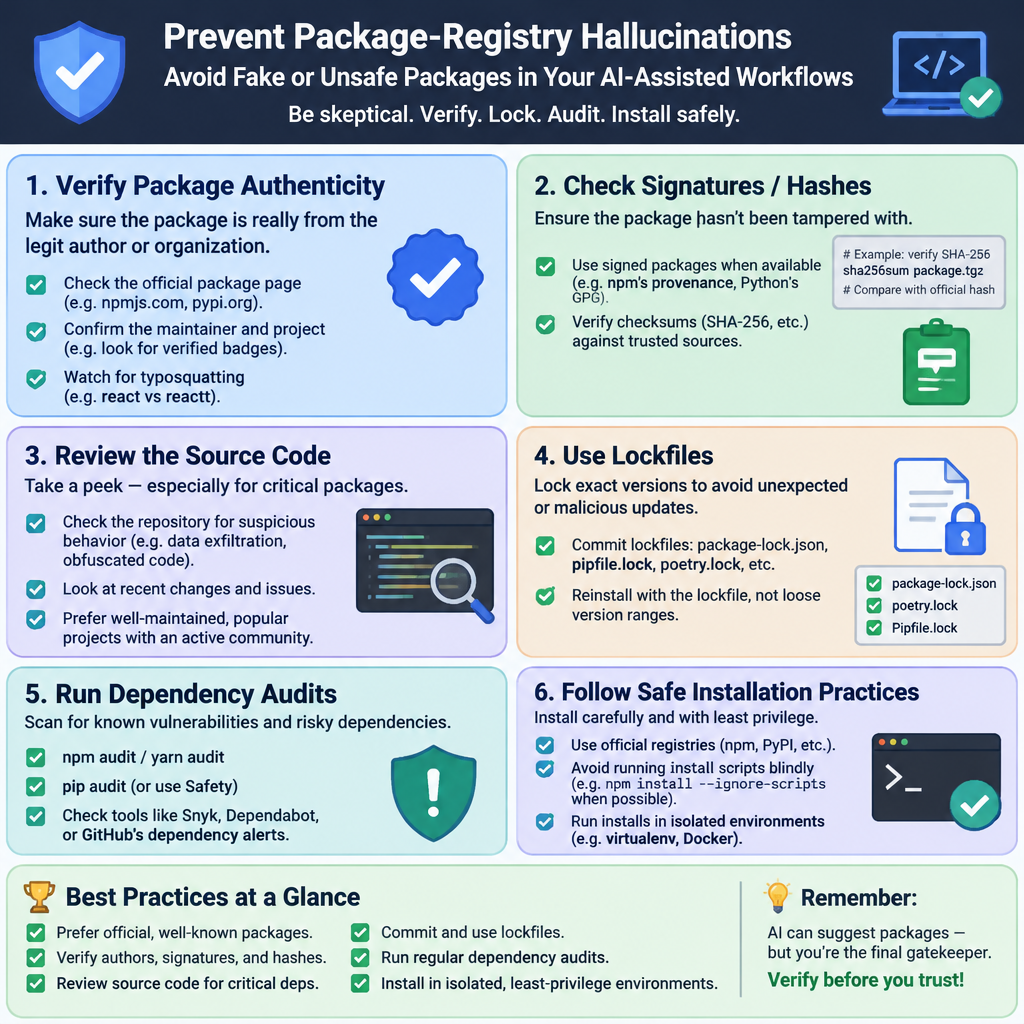
- Check every new package before installation. Search the official registry, confirm the exact name, inspect the maintainer and release history, and compare the package description with the feature you need. Watch for look-alike names, recent ownership changes, and a package that has no meaningful history. A package existing is not proof that it is safe, so do not stop at the first green check.
- Use an approved dependency list. Where it fits your project, maintain an allowlist of packages or approved registries and block unexpected sources. Review additions like code changes, with a reason for the dependency and an owner who will maintain it. A small helper package can add a surprising amount of code and supply-chain exposure. Here’s the kicker: the least risky dependency may be the one your team does not add.
- Pin and record what you install. Use a lockfile, review its changes, and prefer supported versions with known provenance. Where your package tooling supports it, verify integrity checks or signatures and run software composition analysis to identify known vulnerabilities and license concerns. Pinning helps make builds repeatable; it does not prove a package is trustworthy. Keep that distinction clear.
- Verify APIs against versioned documentation. Check that every suggested import, method, and argument exists for the version in your project. Run type checks, linters, unit tests, and integration tests, but also add tests for failure cases and unexpected inputs. If the assistant says a function is available, ask it for a source and then check the source yourself. The model’s citation is a lead, not evidence.
- Give security-sensitive code an independent review. Check authentication flows against current requirements, ensure cryptographic libraries use supported defaults, and confirm cloud IAM policies grant only the permissions needed. For a critical path, ask a qualified reviewer who did not write the prompt or accept the generated code. OWASP’s generative AI risk guidance is a useful starting point, and NIST’s Secure Software Development Framework offers practices that apply whether code came from a human or a model. No shortcut replaces review.
- Keep a record and watch what changes. Record the assistant or model used, the accepted changes, new dependencies, and the checks that ran. Set alerts for dependency updates and review unusual build behavior, especially when a package runs install scripts. If you use retrieval-augmented generation, connect it to documentation your team controls and keep that documentation current. Retrieval can ground an answer in approved material; it cannot guarantee that the model uses the material correctly.
These steps are not paperwork for its own sake. They create a trail that helps an engineer explain why a package was added, what evidence supported a security choice, and who can revisit the decision later. NIST’s Generative AI Profile discusses risks such as confabulation and the value of evaluation, source checks, and human oversight. Use those ideas to improve your process, not to claim that any one tool has removed risk.
AI-Generated Code vs. Human-Written Code
AI-generated code and human-written code fail in different ways, but neither deserves automatic trust. The comparison below is about workflow risks, not a claim that one source always produces safer software. The research cited here examined package hallucinations in model output; it did not provide a direct, apples-to-apples error rate against human developers. That limit matters.
| Area | AI-generated code | Human-written code |
|---|
| Common strength | Produces drafts quickly and can suggest familiar patterns | Uses project context and can ask teammates for missing details |
| Common failure | Plausible but false packages, APIs, or security explanations | Mistakes from memory, rushed work, copy-paste, or unclear requirements |
| Dependency risk | May suggest names that sound real but are not registered | May select an outdated or poorly maintained package |
| Review challenge | Fluent output can make uncertainty hard to see | Familiar code can receive too little review |
| Useful check | Verify names, versions, docs, tests, and security assumptions | Apply the same checks; review assumptions and dependency changes |
| Evidence in cited research | One study of 16 models reported about one in five package recommendations were non-existent and more than 205,000 unique fabricated names in its results | The cited study does not give a matching human-written-code rate |
An experienced developer can spot a strange API, but experience is not a shield against fatigue or a rushed deadline. A model can work from a clearly scoped task, but a clear prompt is not a substitute for a test or a review. Both need controls. Different sources of code call for the same basic discipline: know what entered the project, check what it does, and limit what it can access.
The practical comparison is not “AI or humans.” It is unreviewed output or verified output. A developer who copies an old snippet without checking it can bring in the same stale advice that an assistant might produce. A model that drafts a routine test under a clear review process may save time without adding much risk. The right question is whether the process catches errors before release. That is where teams should spend their effort.
Common Mistakes to Avoid
The first mistake is treating a successful build as proof of safety. A compiler can confirm that code follows syntax rules and that named symbols resolve in the build environment; it cannot tell you whether an authentication design resists phishing or a dependency came from the right publisher. Tests matter, but they only check the cases someone thought to write. Passing tests is a start, not a verdict.
The second mistake is installing a suggested package first and checking it later. That order gives code from an unknown publisher a chance to run during installation or in a build step. Check the registry and package metadata before adding it, then review the lockfile change. I have seen teams spend far more effort recovering from a hurried dependency choice than it would have taken to verify the name up front. Let's be real: a few minutes of checking is cheaper.
Another trap is asking the same model to approve its own security logic. A second answer may sound like a review, but it can repeat the same false assumption or share the same blind spot. Use independent sources: official documentation, a security engineer, a tested policy rule, or a tool designed to check a specific property. Treat an AI review as another opinion, not a sign-off.
Teams can also overrate retrieval-augmented generation. Retrieval gives a model selected documents to work from, which can improve grounding and make answers easier to verify. But the documents might be stale, incomplete, or irrelevant, and the model can still summarize them incorrectly. Maintain source material, show where answers came from, and verify important claims against the actual documentation. There is no magic switch.
Finally, do not focus only on made-up packages. Check permissions, secrets, cryptographic choices, data handling, logging, and recovery flows, too. Generated cloud policies should be compared with the actual task and narrowed to the smallest needed set of actions. The OWASP community tracks risks that include misleading output and excessive reliance on generative AI, which is a useful reminder that human review must be real, not a box ticked after the fact. Every shortcut moves risk onto the people who depend on the system.
Frequently Asked Questions
What is an AI coding hallucination?
It is code or technical advice from an AI model that sounds plausible but is false, unsupported, or unsafe. Examples include a package that does not exist, a function that is not part of the stated library version, or authentication advice that no longer meets the project’s needs. The output can look tidy and still be wrong. Verify it independently.
Can a hallucinated package create a security problem?
Yes. An attacker could register a name that a model repeatedly invents, then publish a package under that name. If a developer installs it, the package may run code with the permissions available to the developer or build environment. Researchers use the term slopsquatting for this kind of risk. Check the official registry, publisher, version history, and project approval before installing any new package; do not assume every fictional name is already under attack.
Does retrieval-augmented generation prevent hallucinations?
No. Retrieval-augmented generation, or RAG, lets a model consult selected documents when it forms an answer, which can reduce reliance on incomplete training knowledge. It does not force the model to interpret a document correctly or prove that the source is current. Use controlled documentation, show citations, and check security-critical claims against the original source. RAG is a useful guardrail, not a guarantee.
How should a team review AI-generated code?
Review it like a contribution from a new developer whose work needs evidence. Confirm each dependency and API against the correct registry and documentation, run tests and security scans, and examine permissions, authentication, cryptography, and data handling. Require an independent human review for critical paths, and keep the lockfile change visible. AI can draft; an accountable engineer still decides what ships.
Final Thought
AI coding assistants are useful when they make careful work faster. They are dangerous when their confident tone gets mistaken for proof, especially around dependencies, identity, cryptography, and access to production systems. The fix is not to ban every assistant or to pretend a prompt can make one infallible. Put ordinary engineering checks around the output and make those checks hard to skip.
I trust a suggestion more after it survives a simple sequence: verify the package, check the documentation, run the tests, inspect the permissions, and ask a person with the right expertise to review the risky parts. That process may feel slower than pasting an answer and moving on. It is faster than cleaning a compromised build or explaining to users why their information was exposed.
Good tools should serve the people who rely on the software, not make them carry hidden risks. That means treating review as part of the work, giving people time to do it, and taking responsibility for the code that reaches production. The assistant can offer a draft. The team owns the decision.